
Chart Slots and Selection
- Multiple chart slots
- Add and remove slots
- D1 and supported divisional charts
- Transit chart
- Independent selection per slot
BNN workspace
Explore planetary progression, activation, directional charts, aspects and transit analysis through MKundali's dedicated BNN workspace.
MKundali brings several important Bhrigu Nandi Nadi analytical tools into one integrated environment. Examine planetary progression through Major and Minor periods, study activated planets, compare directional and fusion charts, analyse planetary aspects and connect progression timelines with recorded life events.
Workspace overview
Unlike Parashari and KP, BNN is a single workspace. Its sections sit one below the other in the BNN tab, and most of the progression sections load once a chart has been calculated and a progression target date is set.
Some tools may be restricted to certain subscription plans. See the Pricing page for current availability.
Section 1 of 10
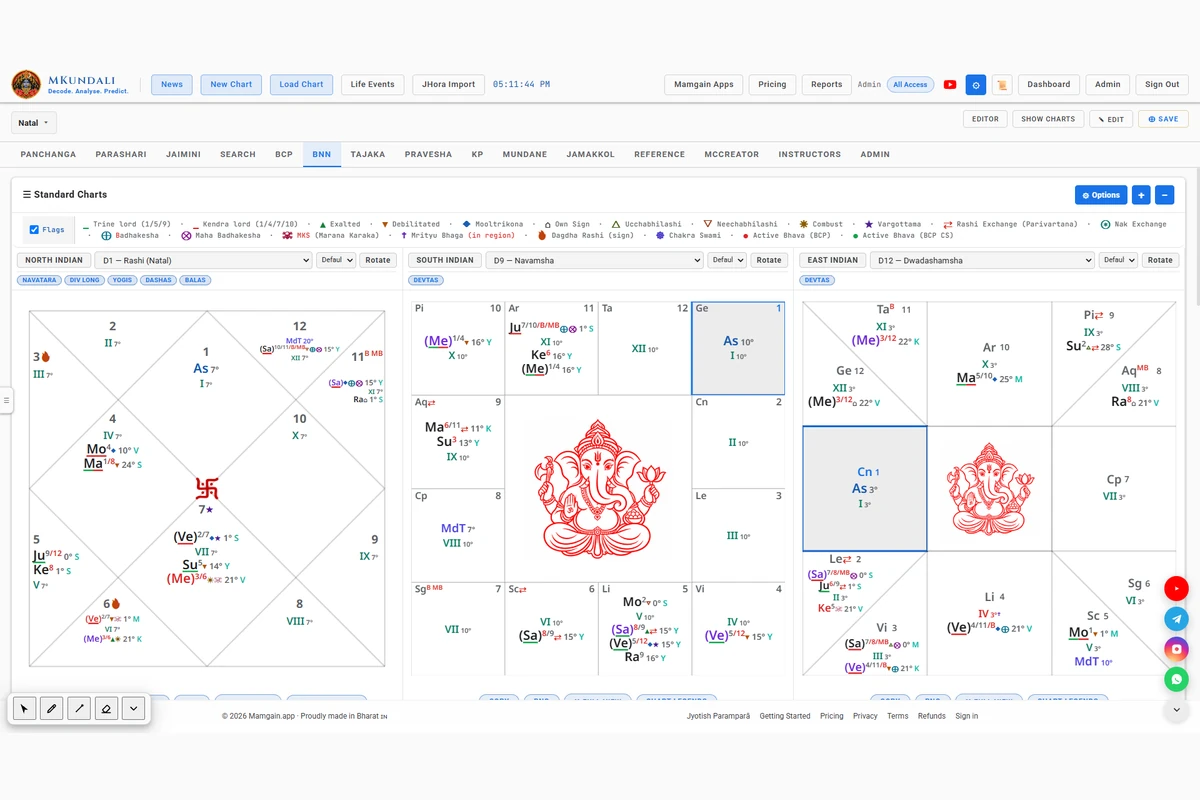
The BNN workspace provides configurable standard chart slots for examining the horoscope through selected divisional charts and available chart sources.
Use multiple chart slots to examine selected chart divisions side by side.
The available charts and options may depend on the subscription plan.
Section 2 of 10
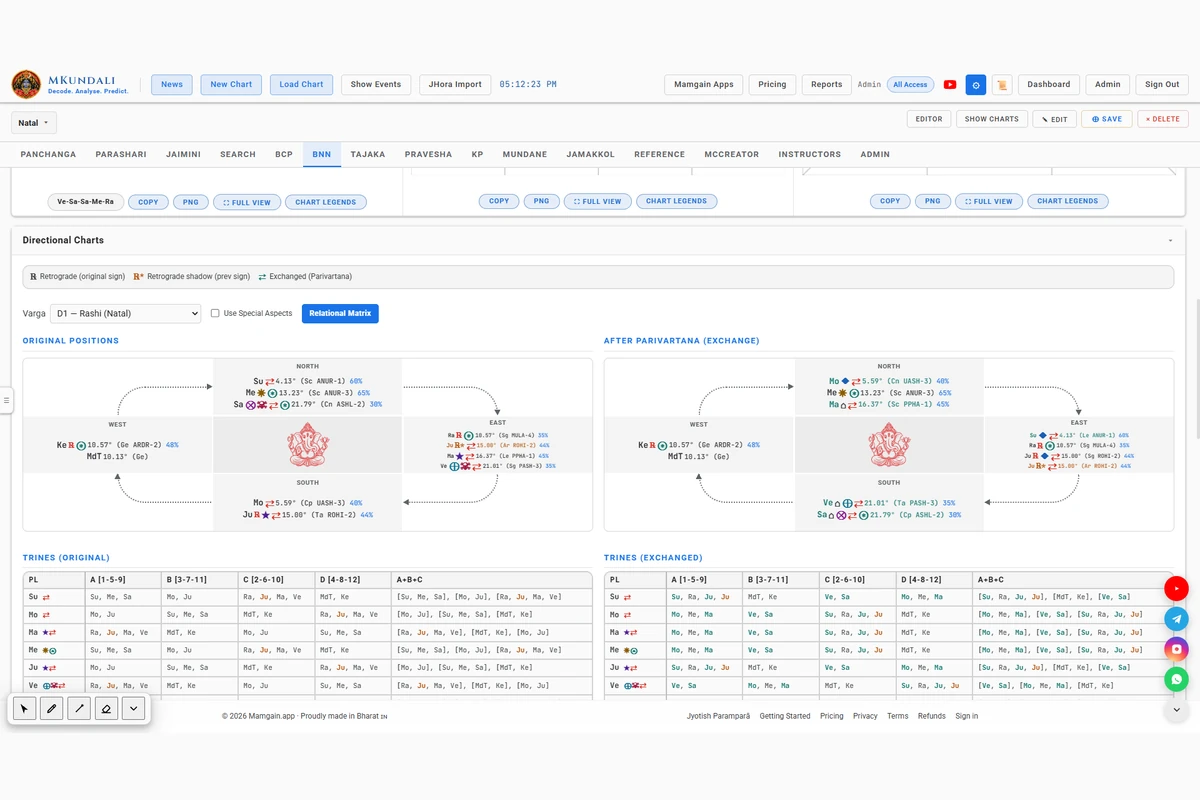
Directional Charts provide a distinctive BNN representation of planetary arrangements. Compare original planetary positions with their positions after Parivartana (exchange) to examine the resulting directional and trinal relationships.
Examine planetary arrangements in the original chart through the directional representation. Retrograde and retrograde-shadow markers are explained in the on-screen legend.
View the corresponding planetary arrangements after the implemented sign-exchange transformations, marked with an exchange indicator.
Examine the directional chart through four planetary groupings. A Trines table is shown for the original chart and for the After Parivartana chart.
Use the Relational Matrix to examine planetary relationships within the chart.
These views present the implemented arrangements. They do not automatically generate every traditional directional interpretation.
Section 3 of 10
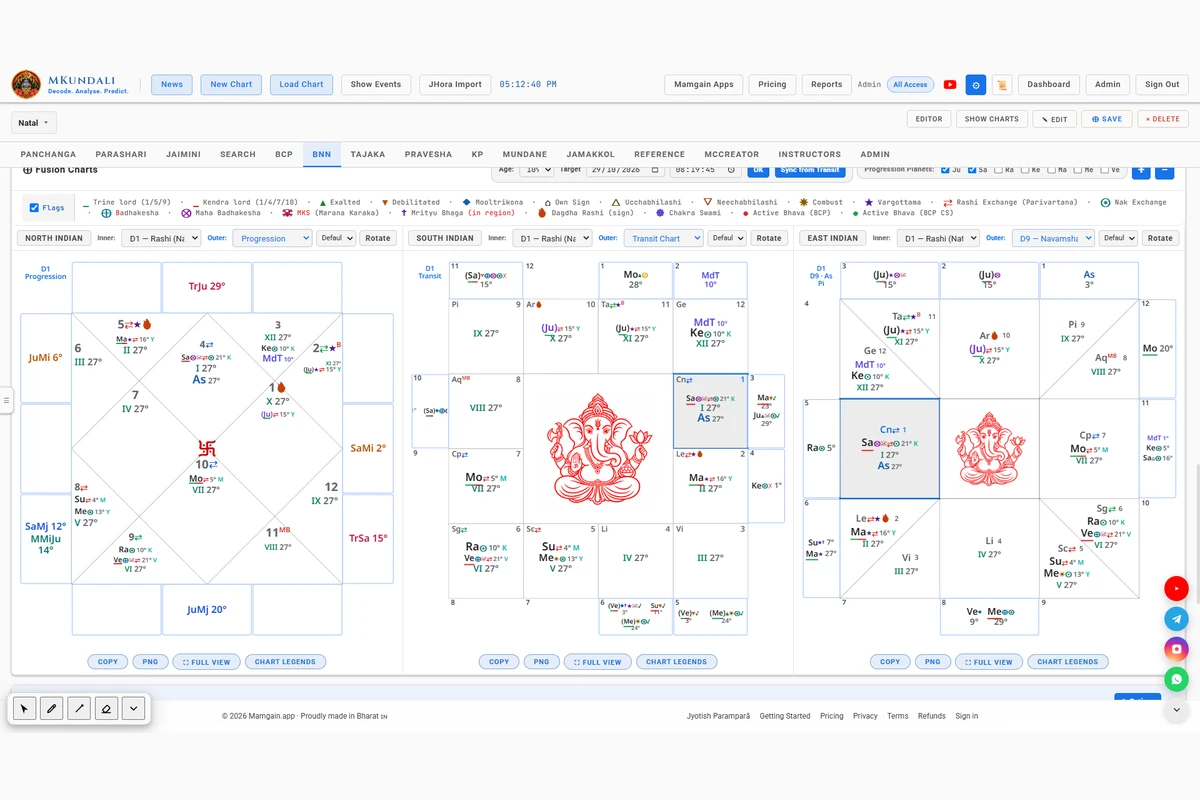
Fusion Charts allow selected chart information to be displayed together through configurable inner and outer chart layers.
BNN provides a dedicated Progression option for the outer Fusion Chart layer.
Filter the progression planets shown on the outer ring to examine selected planetary movements in relation to the inner chart. Jupiter and Saturn are selected by default.
The date and time you enter stay as a draft until you press OK. Choosing an age sets the target to that running year at the birth time.
Examine Major progression rounds through the special Major Rounds outer layer.
Major Rounds is a BNN Fusion-specific outer layer. It is not a standard divisional chart option available elsewhere.
Section 4 of 10
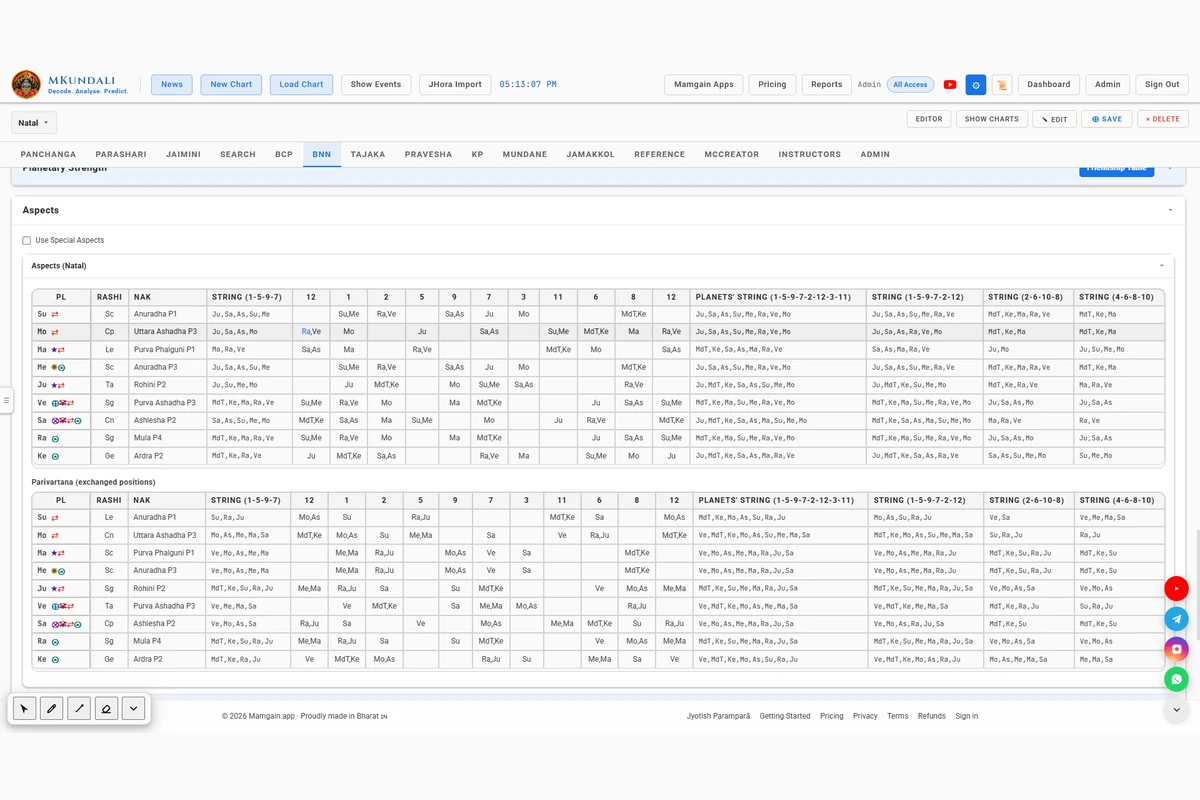
MKundali provides a dedicated BNN Aspects workspace with three analytical views: Natal, Transits and Progression.
Examine planetary relationships in the natal chart through BNN's house-based aspect representation.
Examine transiting planets against the natal chart's planetary and house arrangements.
This view depends on a calculated transit chart.
Examine Major and Minor progressed planetary positions against the natal chart.
MKundali allows the relevant special planetary aspects to be enabled through configurable controls. Each can be switched on or off individually.
These options are separate from the standard BNN house-string representation. Which house columns the Aspects tables show is set in the BNN Aspects section of Preferences.
Section 5 of 10
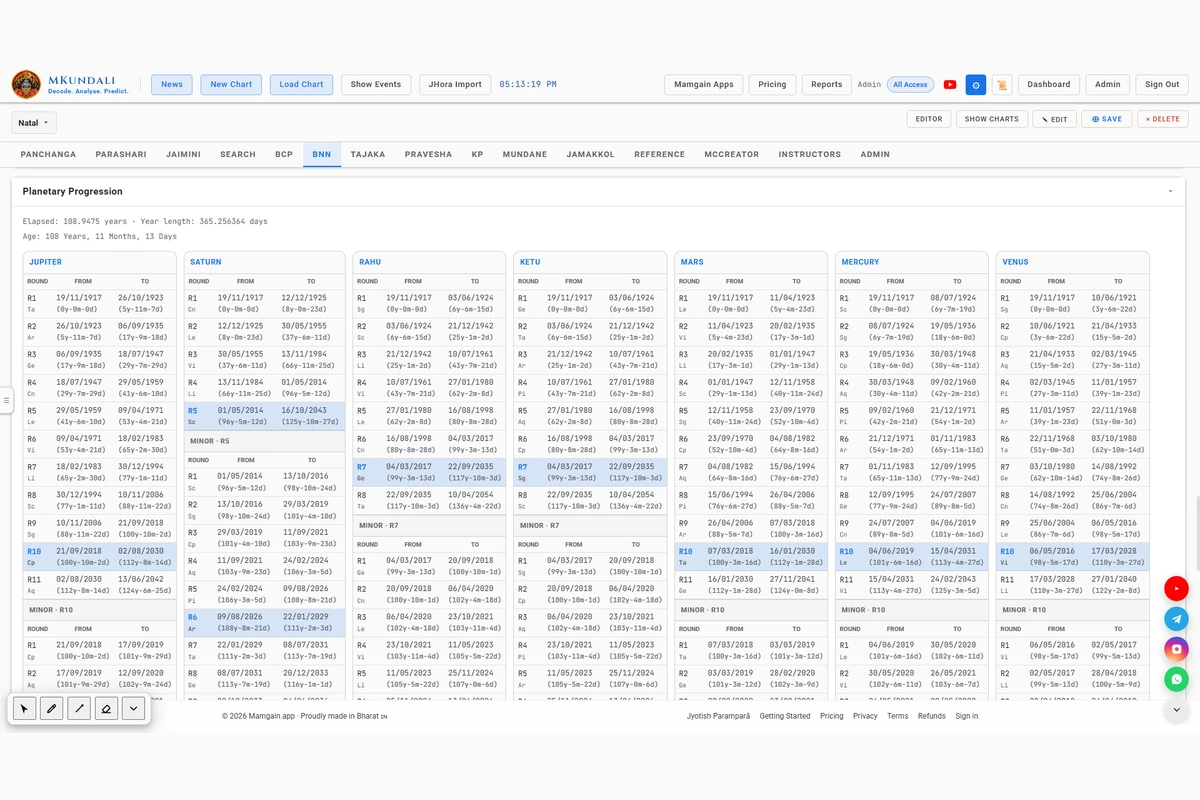
Planetary Progression is one of the central analytical facilities of MKundali's BNN workspace. MKundali calculates Major and Minor progression periods for seven progression grahas, enabling astrologers to examine changing sign positions over a native's lifetime.
Examine the Major progression of each supported graha through its sign sequence and corresponding time periods.
Major rounds that start before age 120 are listed.
Each Major progression contains twelve Minor progression periods, allowing finer examination of the progression sequence.
Select a Major row to see that planet's twelve Minor periods.
MKundali also provides a Month-Minor progression marker (MMiJu) in the BNN Fusion Progression outer ring, shown when Jupiter is selected. A Month-Minor period is one twelfth of a Minor period.
Month-Minor is a Fusion marker. It is not presented as a separate full progression table.
Adjust the progression settings through the existing Preferences system.
MKundali supplies default orbital periods and a default year length. They are editable preferences, not fixed rules, and the defaults are not claimed to be a universal classical rate for every planet.
BNN progression includes dedicated retrograde-handling rules and cusp-shadow calculations.
The rules that apply to the chart are listed beneath the table.
Section 6 of 10 · Key BNN feature
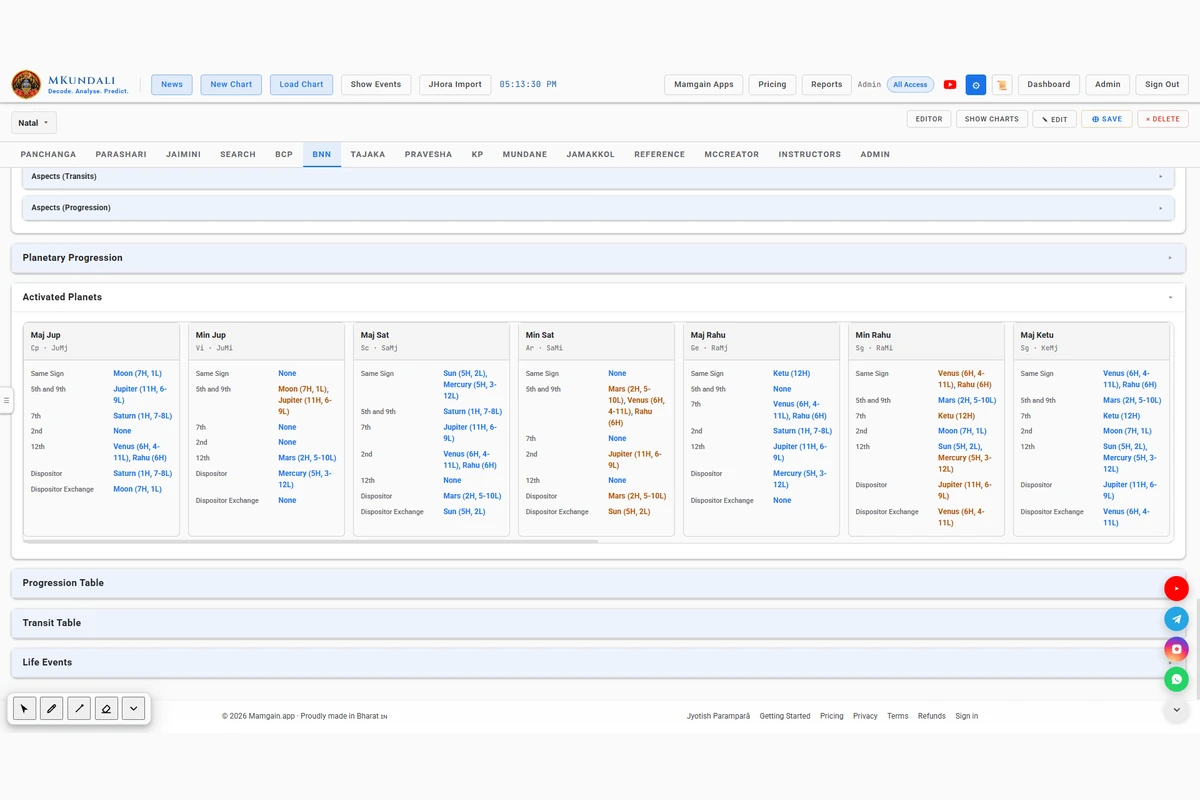
MKundali provides an Activated Planets analysis that connects progressed signs with natal planetary placements. For every supported progression graha, the software examines the natal planets activated by its Major and Minor progressed signs.
Examine separate Major and Minor activation columns for all seven progression planets.
| Progression graha | Major column | Minor column |
|---|---|---|
| Jupiter | Jupiter Major | Jupiter Minor |
| Saturn | Saturn Major | Saturn Minor |
| Rahu | Rahu Major | Rahu Minor |
| Ketu | Ketu Major | Ketu Minor |
| Mars | Mars Major | Mars Minor |
| Mercury | Mercury Major | Mercury Minor |
| Venus | Venus Major | Venus Minor |
Each column header also shows the progressed sign. The columns scroll horizontally.
For each progressed sign, the natal planets are grouped by these relationships:
The Dispositor row names the sign lord of the progressed sign. It is shown for every column.
The Dispositor Exchange row shows the natal Parivartana partner of that dispositor. It shows None when the dispositor has no exchange.
Compare the activation lists of Major and Minor progression periods to identify common and changing planetary connections. A planet that appears in both the Major and Minor column of the same graha is highlighted in the Minor column.
Section 7 of 10
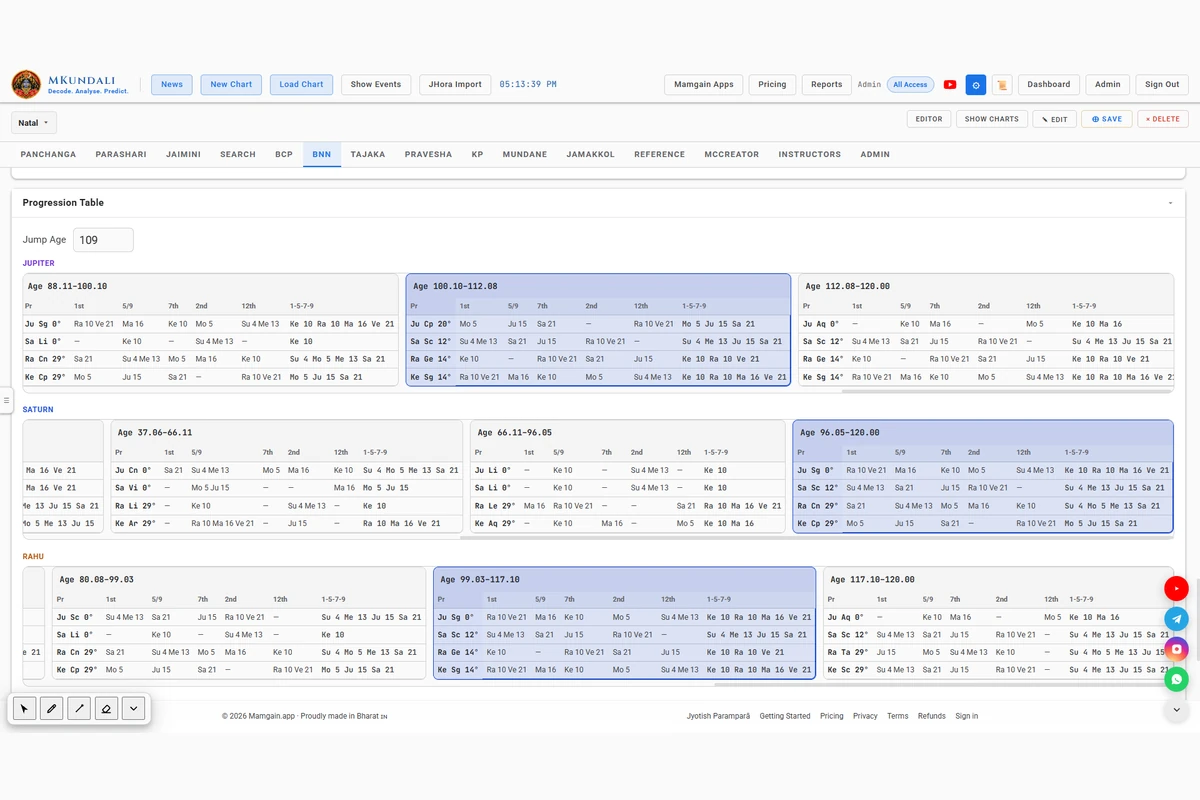
The Progression Table provides an age-oriented view of the Major progression sequences of Jupiter, Saturn, Rahu and Ketu.
Each strip has one card per Major sign period, with the running age span in its header. The main Planetary Progression engine calculates seven planets, but this table shows only these four, and the other three are not presented in the same strip form.
Select a Major sign period to examine its associated activation information. Use Jump Age to locate the progression period for a running year.
Section 8 of 10
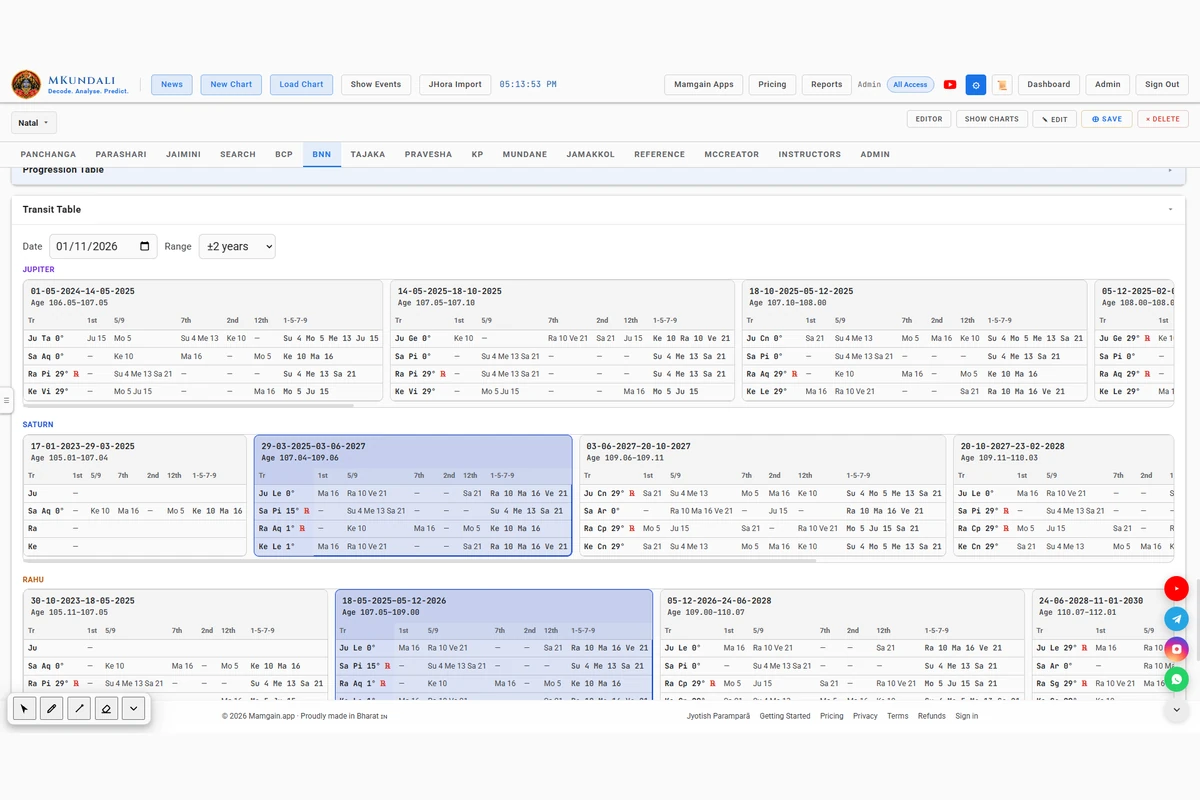
The BNN Transit Table provides an age-oriented view of selected planetary transits around a chosen date.
Use the date and range controls to examine the sign-occupancy periods that overlap the selected transit window.
The table displays transit spans calculated with Swiss Ephemeris.
This is a transit occupancy analysis. It is separate from BNN planetary progression.
Section 9 of 10
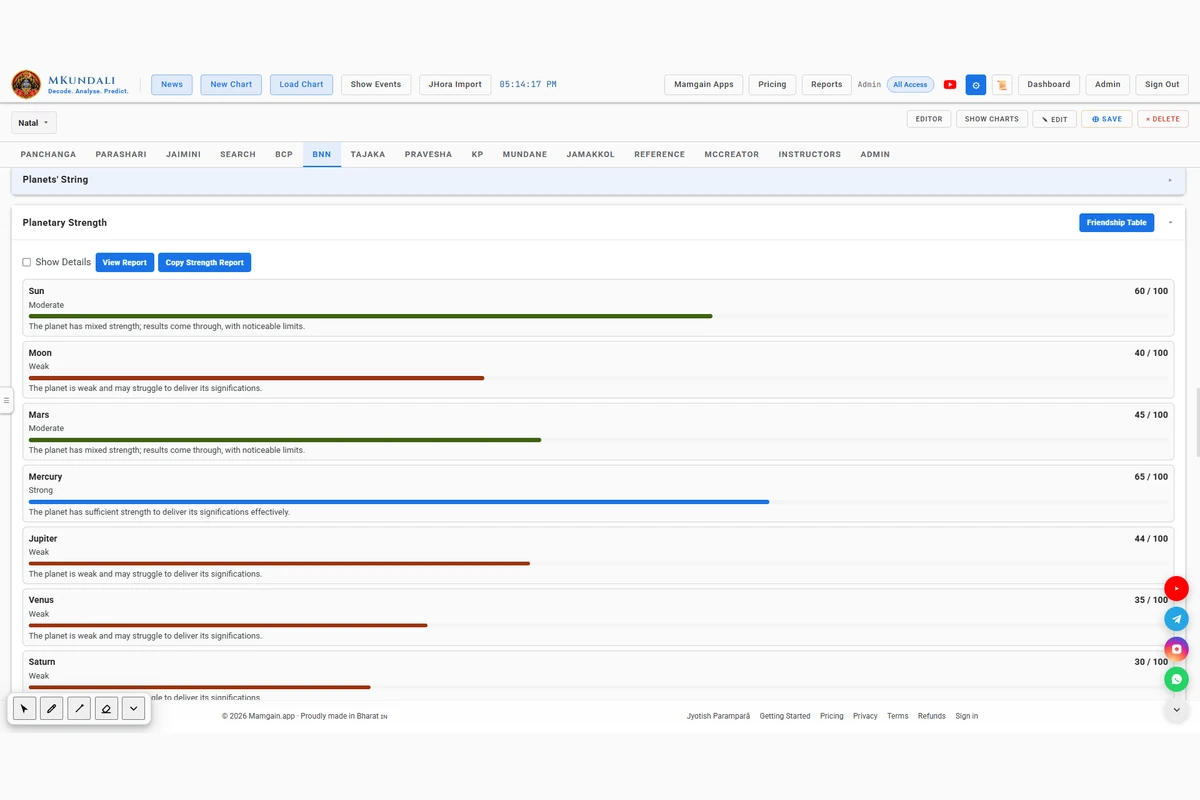
MKundali includes a dedicated Planetary Strength card within the BNN workspace. It provides a score and classification for each planet based on the implemented BNN strength model.
Review the strength score of the nine grahas on a 0–100 scale.
Each classification comes with a short interpretive line.
Examine planetary friendship relationships through the dedicated Friendship Table. For each planet it lists Friends and Enemies, followed by the listed exceptions. Planets that appear in neither list are treated as neutral. The table is attributed in the application to Shree Jitendra Trivedi.
This is MKundali's friendship framework for its BNN strength model. It is not classical Shadbala and it is not the standard Naisargika Maitri.
Review the assigned strength classification and its associated interpretive text.
A BNN score is a software-generated indication from the implemented model. It is not a scientifically measured strength and does not guarantee any result.
Section 10 of 10
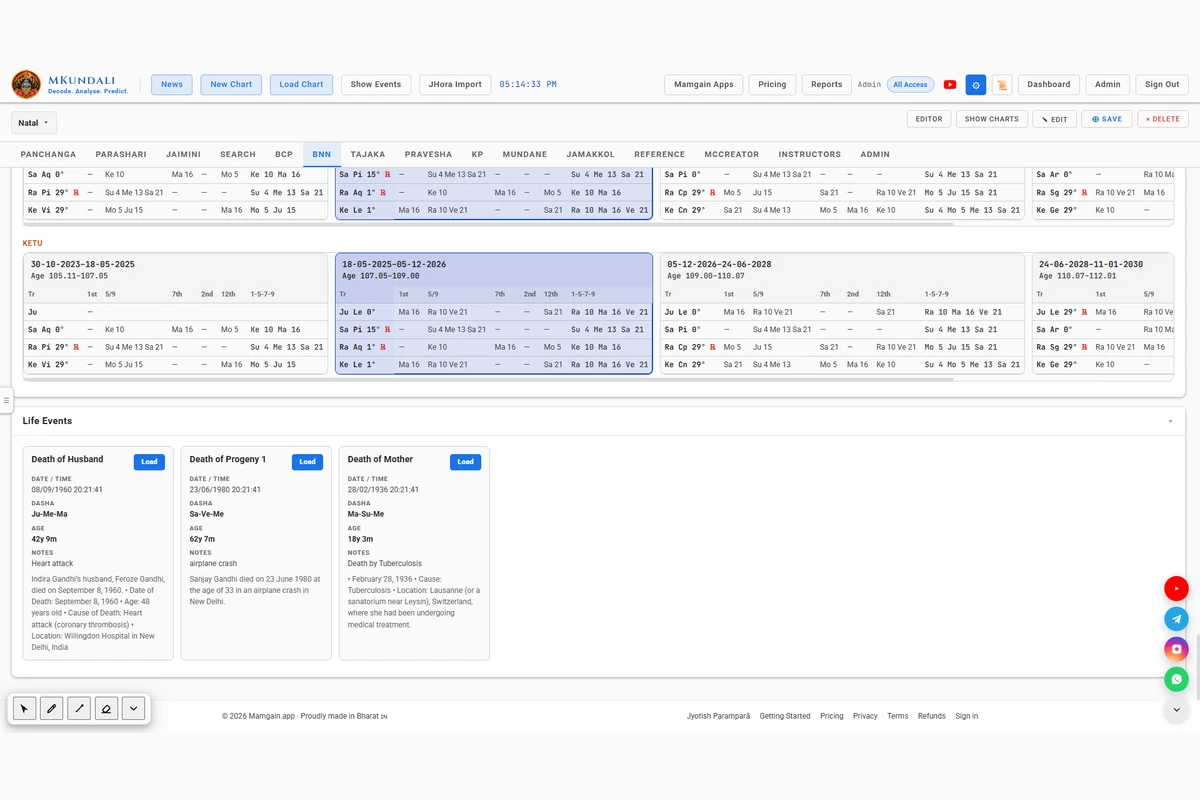
MKundali integrates saved chart Life Events with its BNN Planetary Progression workspace.
Save significant events against a chart and review their associated details.
Select a recorded event and use Load to set its date as the BNN progression target.
Use this workflow to examine how the planetary progression sequence relates to the dates of recorded life events. MKundali does not independently predict or verify events.
Why MKundali
BNN analysis involves planetary progression, directional arrangements, planetary activation and timing relationships. MKundali brings these tools together in one dedicated workspace.
MKundali provides calculation and analysis tools. Interpretation remains with the astrologer, and the tools do not guarantee the accuracy of any prediction. Explore the related Parashari, Jaimini, KP and BCP workspaces.
FAQ
Bhrigu Nandi Nadi (BNN) is a traditional Nadi-based astrological approach that examines planetary relationships, planetary progression and related chart factors.
MKundali calculates progression for seven grahas: Jupiter, Saturn, Rahu, Ketu, Mars, Mercury and Venus.
The Major progression tracks a planet through its sign sequence. Each Major period is subdivided into twelve Minor periods for more detailed timing examination.
Yes. It displays Major and Minor activated planets for all seven progression grahas, using the implemented Same Sign, 5th/9th, 7th, 2nd, 12th, Dispositor and Dispositor Exchange categories.
Yes. Directional Charts provide Original and After Parivartana representations, together with the available trinal analysis.
Yes. The workspace provides Natal, Transit and Progression aspect analysis with selectable special-aspect options.
Yes. The Transit Table displays Jupiter, Saturn, Rahu and Ketu sign-occupancy periods around a selected date and range.
Yes. Preferences provide orbital-period settings for the seven progression grahas and year-length options, including Sidereal, Savana and Custom.
Yes. It includes a dedicated BNN strength model with 0–100 scores, strength classifications, interpretations and a Planetary Friendship Table.
Yes. Select a saved Life Event and use Load to set its date as the progression target.
Access to individual tools may depend on subscription plans and entitlements. Refer to the Pricing page for current availability.
Examine planetary progression, activated planets, directional charts, aspects, transit movements and Life Events through one integrated BNN workspace.