
Chart Selection
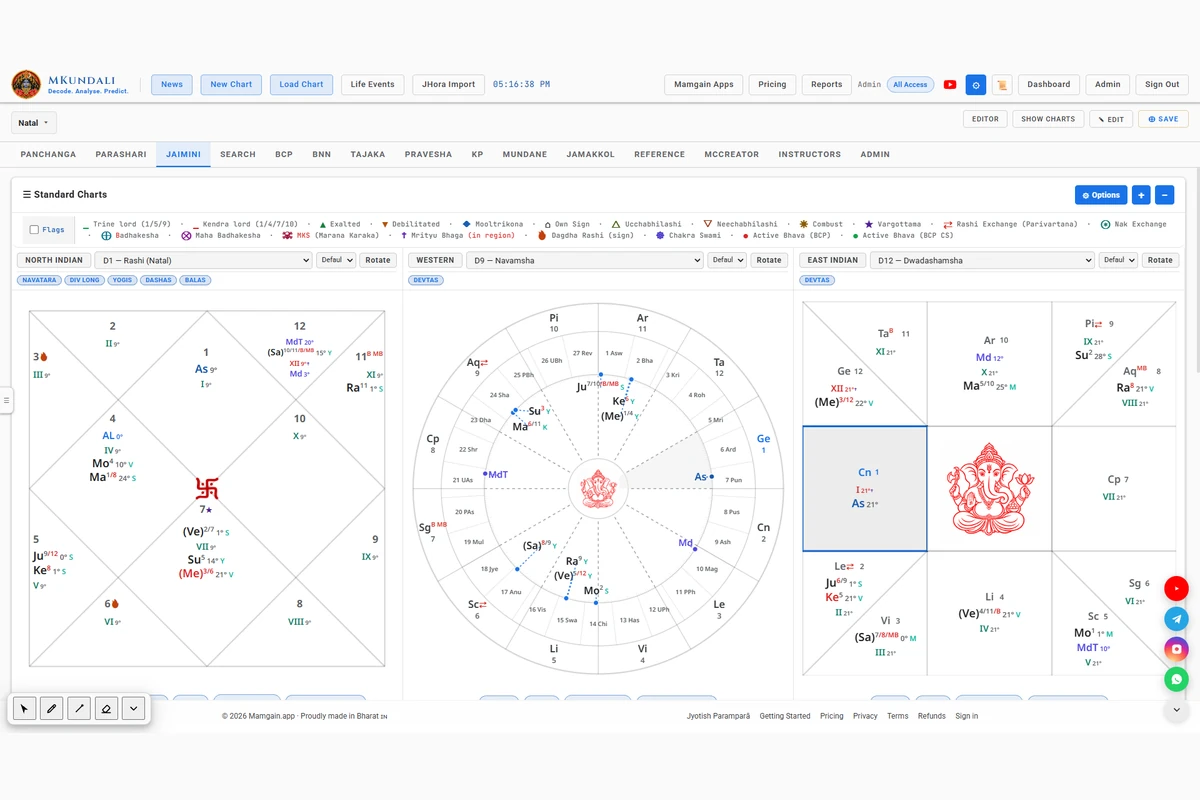
- D1 – Rashi
- D3 – Drekkana
- D7 – Saptamsha
- D9 – Navamsha
- D10 – Dashamsha
- D12 – Dwadashamsha
- Other supported divisional charts
- Transit chart
The available selection is controlled by existing chart and subscription permissions.
Jaimini workspace
Explore Jaimini astrology through Chara Karakas, Argala, Arudha Padas, divisional charts, fusion charts and Chara Dasha analysis.
MKundali provides a dedicated Jaimini workspace for examining planetary charts, Chara Karakas and Argala. With additional support for Arudha Padas, Jaimini Chara Dasha and selected Jaimini-linked Yoga analysis, the software brings several important elements of Jaimini astrology into one integrated environment.
Workspace overview
The Jaimini tab has four components. Other Jaimini-related facilities live in shared workspaces and are reached from there, not from the Jaimini tab.
Some tools may be restricted to certain subscription plans. See the Pricing page for current availability.
Jaimini workspace
The Jaimini workspace provides multiple standard chart slots for examining the Rashi chart and selected divisional charts. Configure the chart presentation and switch between different Varga views within the same workspace.
The available selection is controlled by existing chart and subscription permissions.
These options allow astrologers to examine several chart divisions side by side without repeatedly switching between separate workspaces. Individual chart types and options may depend on the subscription plan.
Jaimini workspace
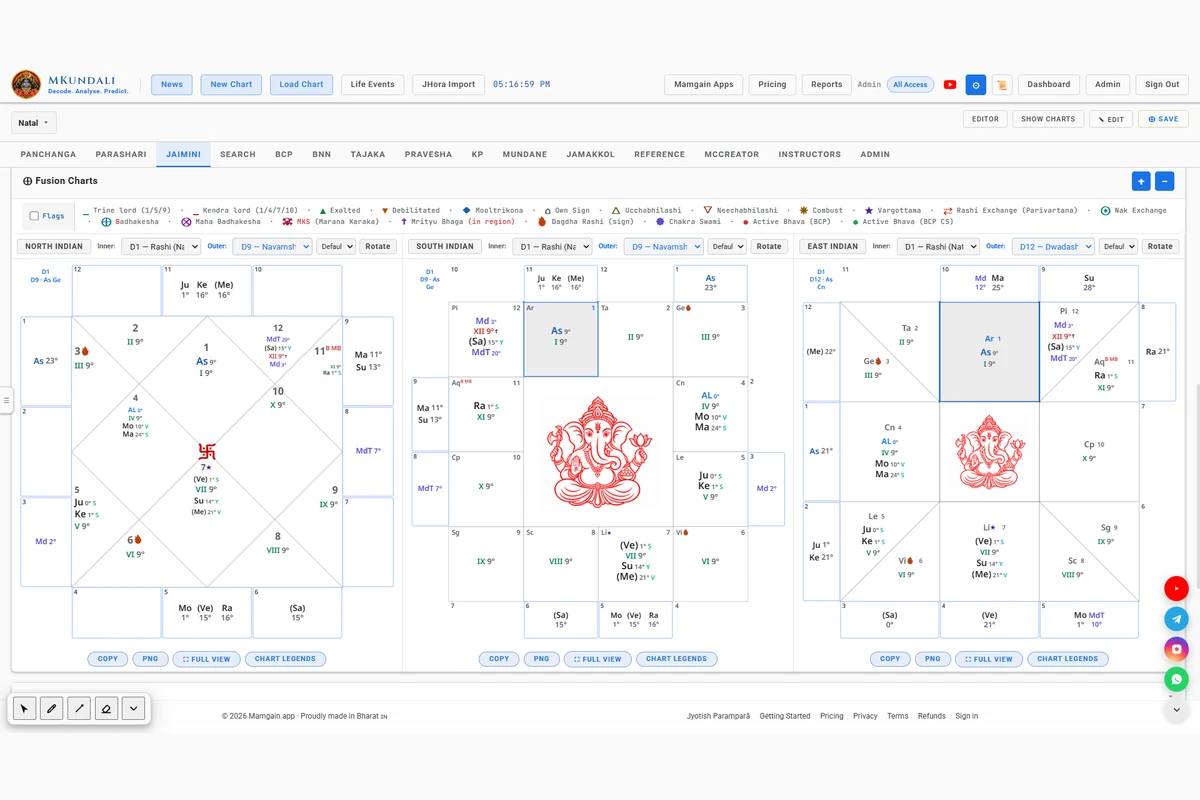
Fusion Charts allow the astrologer to combine two selected chart layers in one graphical representation. The inner and outer layers can be configured independently.
Where supported by the fusion selector, the outer layer can also be a special chart layer.
Arudha Padas are explained in their own section. Some special layers are outer-only, and availability may depend on the subscription plan.
Fusion Charts make it easier to examine relationships between selected chart divisions and specialised chart overlays in one view.
Jaimini workspace
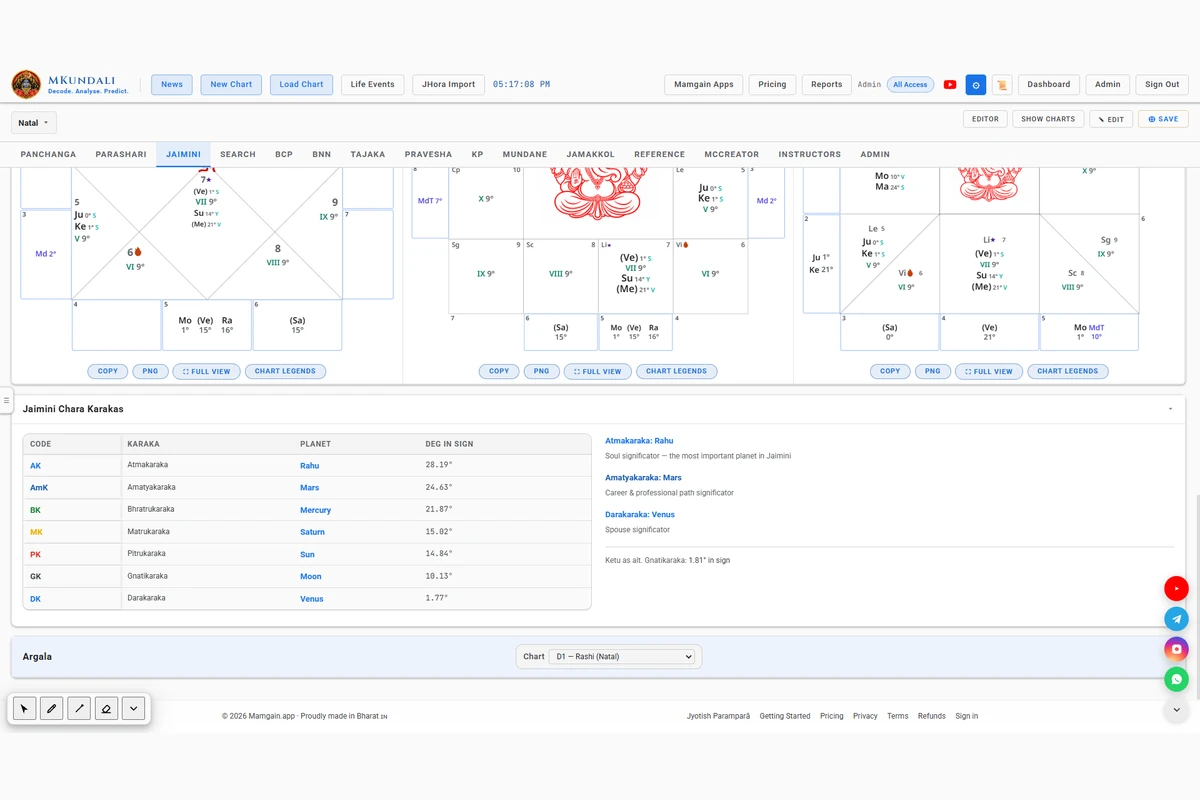
Chara Karakas are central to Jaimini chart interpretation. MKundali calculates and displays the selected Chara Karaka scheme using planetary degrees within their respective signs.
The table shows four columns: Code, Karaka, Planet and Degree in Sign. The labels follow the selected scheme.
| Code | Karaka | Scheme note |
|---|---|---|
| AK | Atmakaraka | All schemes |
| AmK | Amatyakaraka | All schemes |
| BK | Bhratrukaraka | All schemes |
| MK | Matrukaraka | All schemes |
| PiK | Pitrukaraka | 8-karaka scheme only |
| PK | Pitrukaraka (7-karaka schemes) or Putrakaraka (8-karaka scheme) | Follows the selected scheme |
| GK | Gnatikaraka | All schemes |
| DK | Darakaraka | All schemes |
Planetary degrees within their respective signs are used to determine the Chara Karaka ranking. Rahu is treated using the reverse degree calculation implemented in MKundali (30 minus its degree in the sign).
Select the Chara Karaka scheme through the existing Preferences settings. The resulting assignments are displayed in the Jaimini workspace. Three options are available:
Beside the table, the summary highlights three Karakas:
The application also shows Ketu's degree as an alternate Gnatikaraka where applicable. It is informational and is not part of the ranking.
Jaimini workspace
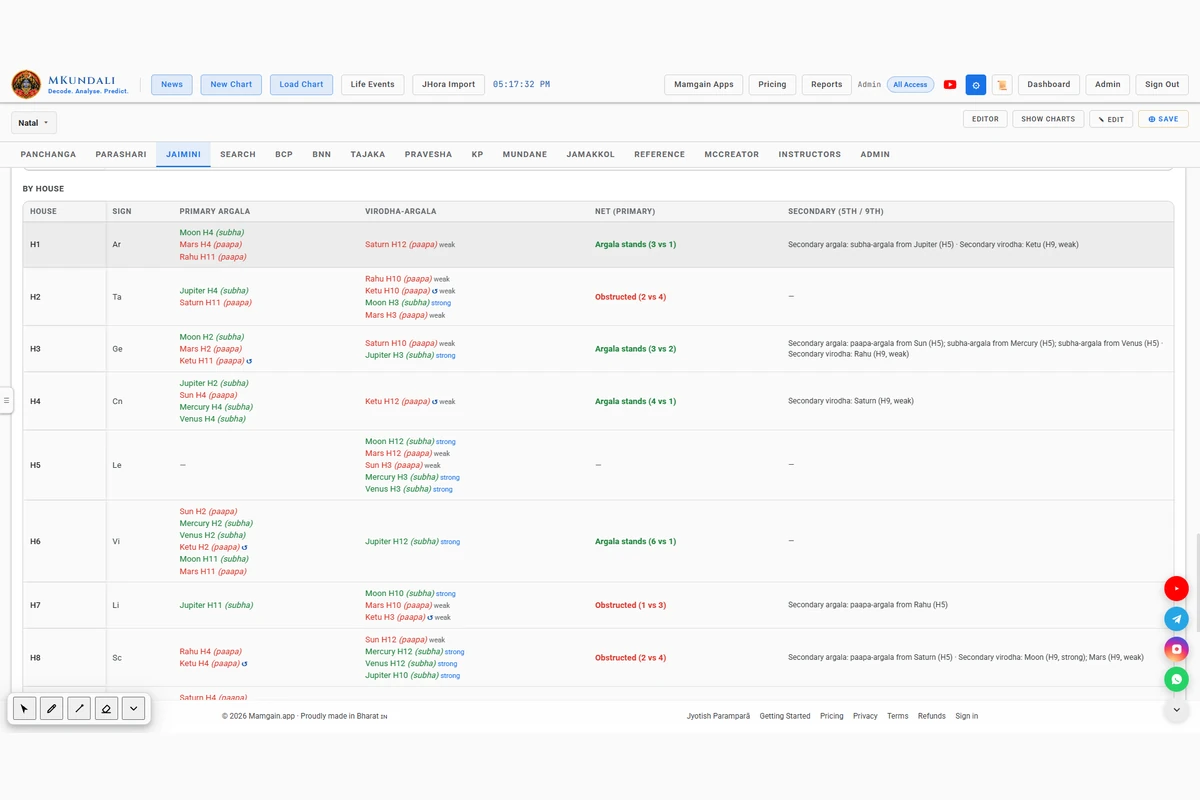
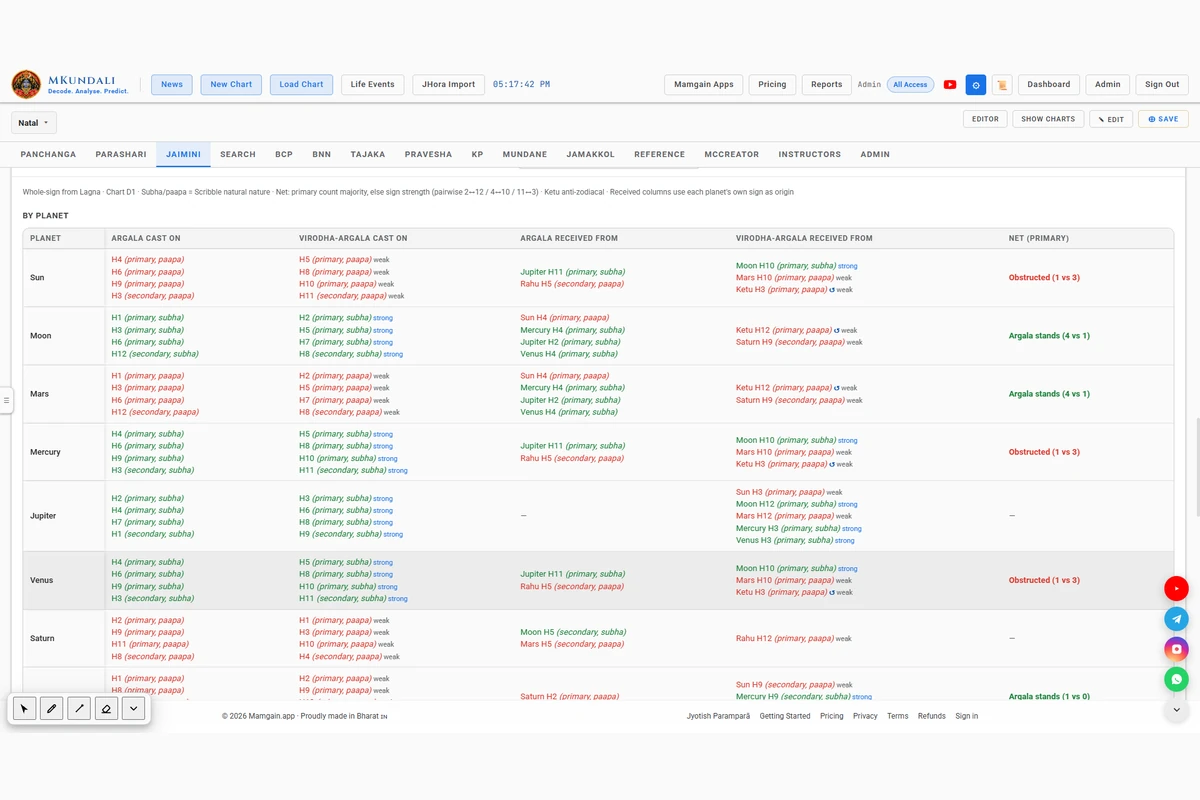
Argala and Virodha-Argala are important components of Jaimini analysis. MKundali provides a dedicated Argala workspace for examining how planets influence houses and other planetary positions through Argala and its obstruction.
Select the divisional chart for which Argala analysis is required. The available Varga selection is subject to subscription permissions.
The Net (primary) column shows whether primary Argala stands, is obstructed, is contested or has no relevant influence.
The Net result is based on primary Argala (2nd, 4th and 11th) against Virodha-Argala (12th, 10th and 3rd). Secondary 5th and 9th positions are listed separately and do not change the primary Net result.
MKundali documents its handling of several Argala-specific conditions and rule variations in the workspace itself.
These are MKundali's documented choices. They do not represent every Jaimini tradition, and different schools do not all use identical Argala rules. The workspace notes which common variants it does not apply.
Shared: Fusion Charts
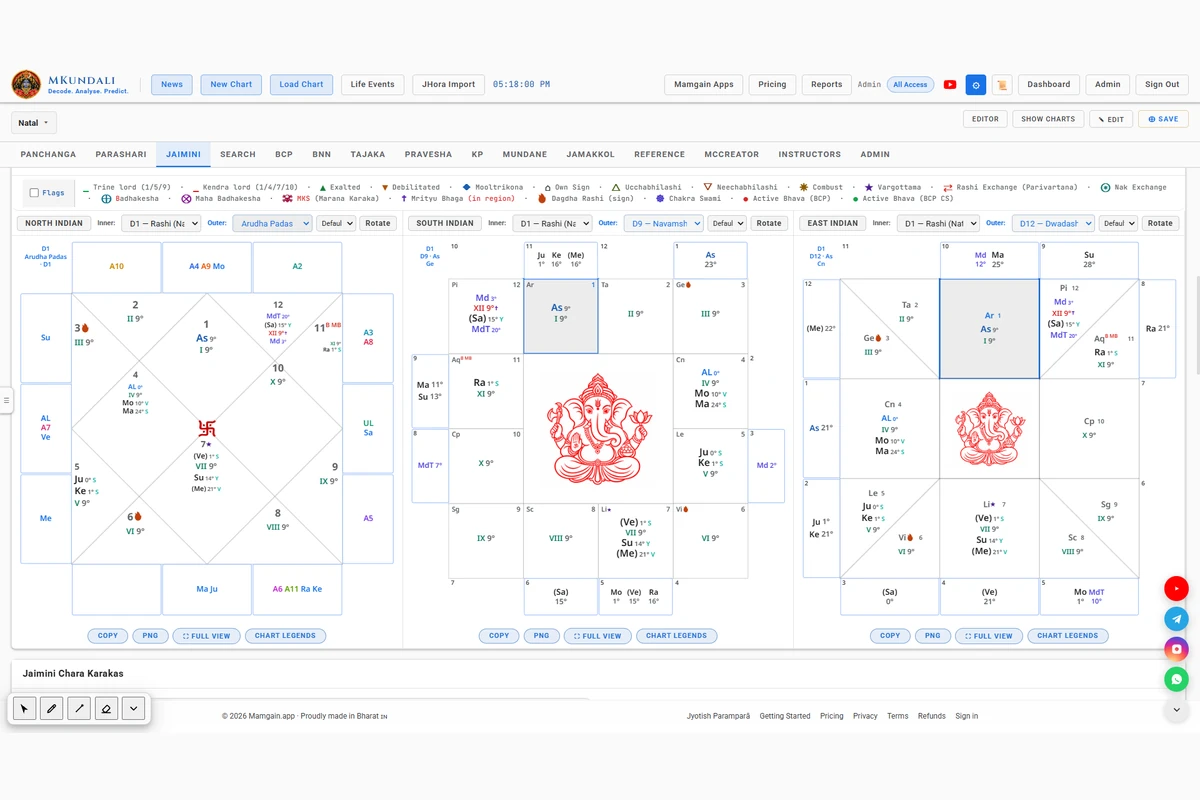
MKundali provides Arudha Pada representations through the special Fusion Chart outer layer. It combines Bhava Arudhas and Graha Arudhas in one graphical view.
Examine the Arudha Padas associated with all twelve houses.
The nine Graha Arudhas are displayed for:
MKundali can display twelve Bhava Arudhas and nine Graha Arudhas together on the outer ring of a Fusion Chart: a combined display of 21 Arudha points.
The Arudhas are calculated for the chart chosen as the inner layer (D1 by default).
Preferences include an “Arudha Follows” setting that determines which lord to follow when calculating Arudhas.
Use the existing Preferences setting to control the calculation method.
Arudha Padas are not a separate Jaimini tab. They are an outer-layer option within Fusion Charts.
Shared: Rashi Dashas
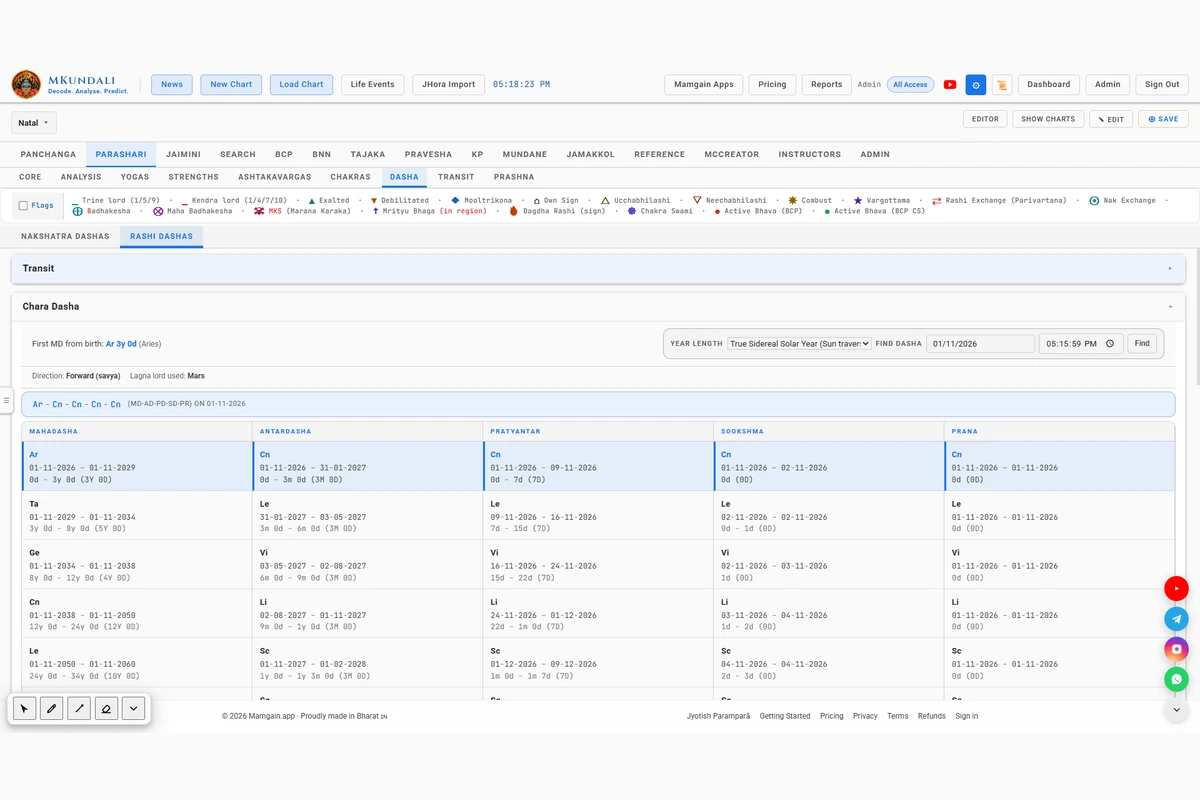
Jaimini Chara Dasha is a sign-based Dasha system. MKundali provides two separate implementations within its shared Rashi Dashas workspace.
Find them under Parashari → Dasha → Rashi Dashas. Chara Dasha is part of the general Dasha workspace and is not a tab inside the Jaimini workspace.
Examine Chara Dasha using the implemented JHora D1 and PVR-leaning calculation approach.
The first Mahadasha starts at birth with its full calculated duration, with no Lagna-degree remainder.
Use the separately implemented Chara Dasha method based on Shri K.N. Rao's approach.
The first Mahadasha also starts at birth with its full calculated duration.
Both Chara Dasha implementations provide the application's shared Dasha controls.
The two methods use different rules for period order, years and subdivisions, so they are not interchangeable. Each is shown in its own panel.
Shared: Yogas
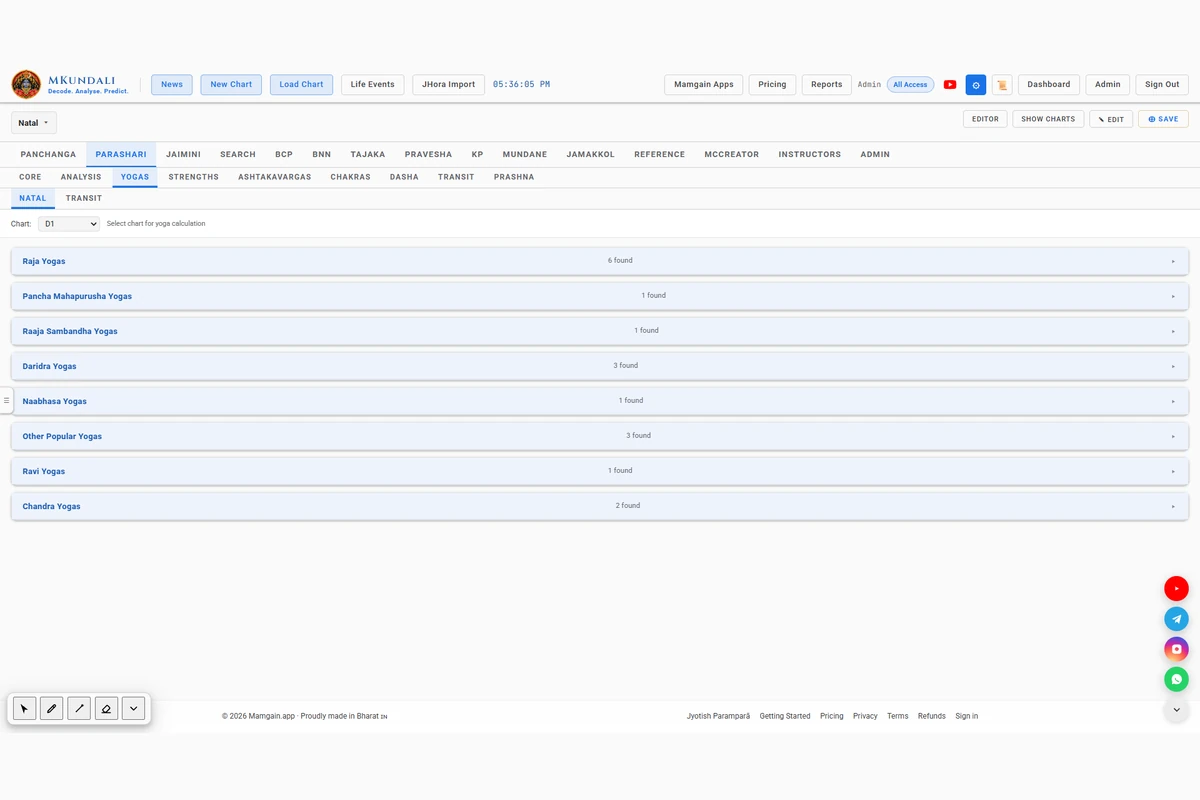
MKundali's shared Yoga workspace uses Chara Karaka information in selected planetary combination analyses.
These relationships allow selected Jaimini Karaka and Arudha factors to be considered alongside the shared Yoga analysis.
The Yoga workspace is shared and is not a separate Jaimini Yoga engine. Not every classical Jaimini Yoga is implemented.
Why MKundali
Jaimini astrology involves several connected concepts, including Chara Karakas, Argala, Arudhas and sign-based Dasha systems. MKundali brings these tools together across its Jaimini and shared analytical workspaces.
MKundali provides calculation and analysis tools. Interpretation remains with the astrologer, and the tools do not guarantee the accuracy of any prediction. Explore the related Parashari, KP and BNN workspaces.
FAQ
The Jaimini workspace provides Standard Charts, Fusion Charts, Chara Karakas and Argala. Related tools include Arudha Padas, Chara Dasha and selected Jaimini-linked Yoga analysis.
Yes. It calculates and displays Chara Karakas using the available seven- and eight-karaka scheme preferences.
Yes. Preferences provide three options: seven Karakas excluding Pitri, seven Karakas including Pitri and eight Karakas including Rahu.
Yes. The Jaimini workspace provides Argala analysis by house and by planet, including primary Argala, Virodha-Argala and Net assessment.
Yes. Fusion Charts provide a special Arudha Padas outer layer containing twelve Bhava Arudhas and nine Graha Arudhas.
Preferences provide Stronger Dual Lord and Classical Lords options.
Yes. The shared Rashi Dashas workspace includes two implementations: the JHora/PVR-leaning Chara Dasha and Shri K.N. Rao Chara Dasha.
Yes. Standard and Fusion chart workspaces allow the astrologer to select and compare the supported divisional charts.
Access to individual tools may depend on subscription plans and entitlements. Refer to the Pricing page for current availability.
From Chara Karakas and Argala to Arudha Padas, divisional charts and Chara Dasha, bring your Jaimini analysis together in one integrated environment.