MKundali Decode. Analyse. Predict.

Mundane workspace

Mundane Astrology Software for Lunar, Solar and Eclipse Analysis

Explore lunar and solar calendar charts, planetary ingresses, Ardra Pravesh, eclipse charts and Swearing-in Dasha analysis through MKundali.

MKundali brings multiple Mundane astrology tools into one integrated workspace. Examine lunar and solar calendar events, calculate planetary ingress charts, study lunar and solar eclipses at selected contact times and analyse the term of an office through Compressed Vimshottari.

The Mundane workspace uses the selected chart’s date, time and geographical location as its reference. Calculate a chart first, then use the Mundane tools for that place.

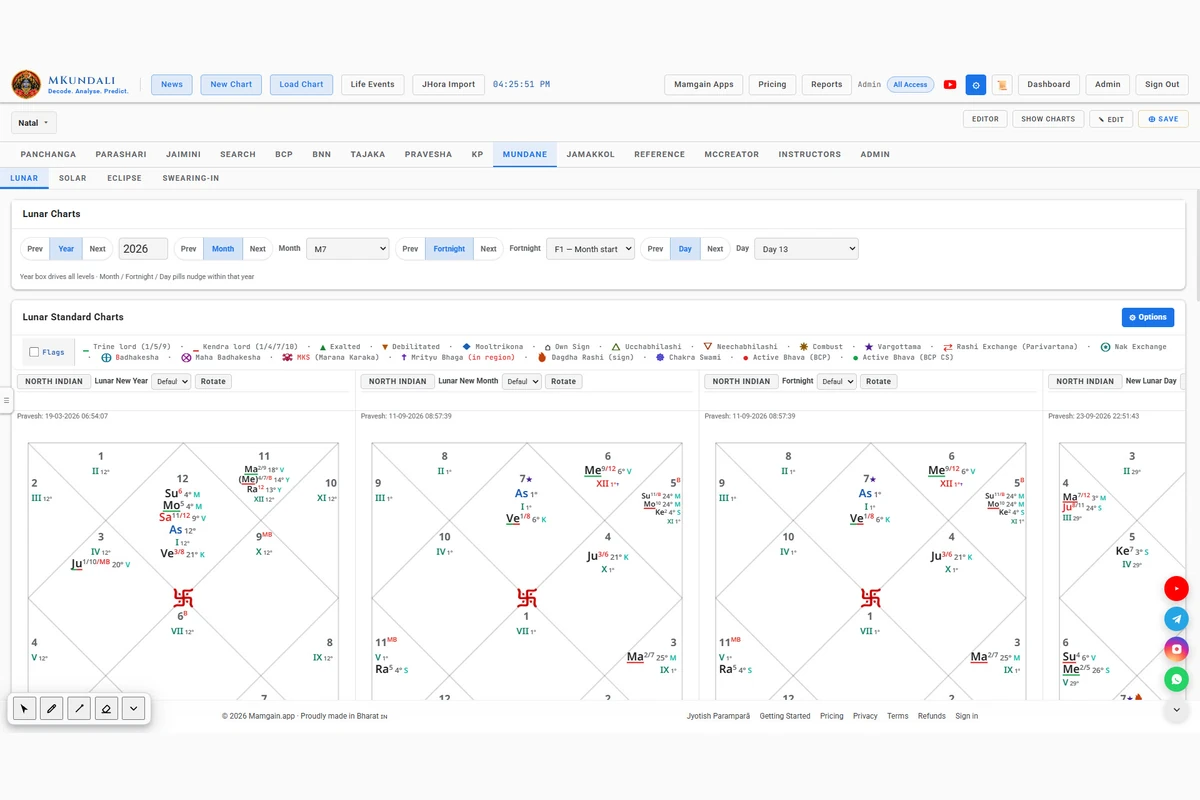
MKundali Mundane Lunar workspace with Lunar New Year controls and chart

Workspace overview

One Mundane Workspace, Four Subtabs

The Mundane tab opens with four subtabs. Lunar and Solar cast calendar charts, Eclipse casts charts at eclipse contact times, and Swearing-in compresses Vimshottari into the term of an office.

  1. 1LunarNew Year, Month, Fortnight, Day
  2. 2SolarNew Year, months, ingresses, Ardra
  3. 3EclipseLunar, Global Solar, Local Solar
  4. 4Swearing-inTerm-based Vimshottari

Some tools may be restricted to certain subscription plans. See the Pricing page for current availability.

Subtab 1 of 4

Lunar – Explore Lunar New Year, Month, Fortnight and Day Charts

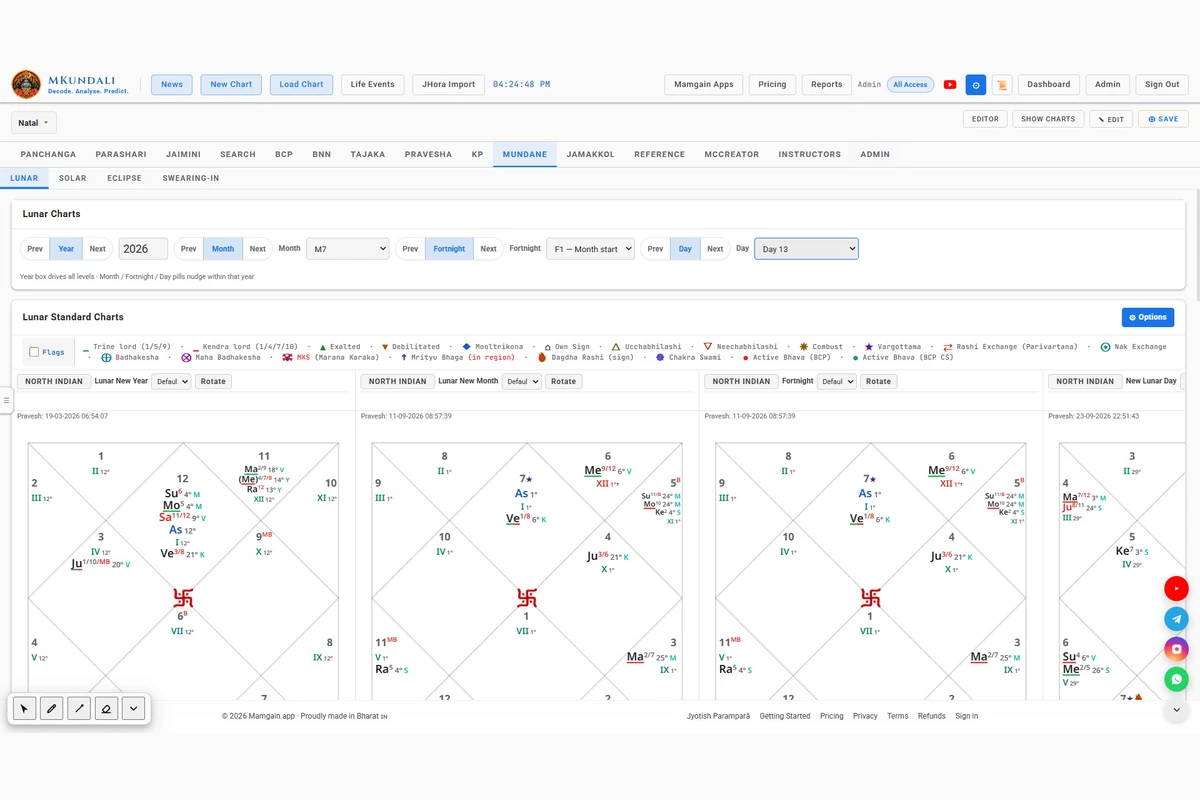
MKundali provides a dedicated Lunar workspace for calculating charts associated with significant lunar calendar boundaries. Examine Lunar New Year, successive Lunar New Months, fortnight beginnings and individual New Lunar Day moments.

Lunar New Year

Calculate the Lunar New Year using a Sun–Moon conjunction occurring in the selected year-start sign.

  • Calendar year selection
  • Previous and Next year navigation
  • Configurable year-start sign
  • Exact New Moon conjunction
  • Local date and time
  • Resulting chart

The year-start sign comes from the Lunar Calendar preferences. The default is Pisces.

Lunar New Month

Examine successive lunar month boundaries within the selected lunar year.

  • AAmanta: the month begins at the New Moon
  • SSuklanta: the month begins at the Full Moon
  • ☼Solar: the month begins at the solar ingress

The selected definition determines the boundaries of the month sequence. It is a separate Lunar Calendar preference, not the general Panchanga month-begins preference. Months run from the Lunar New Year until the next one, so their number follows the boundaries found.

Fortnight

Examine charts calculated at the beginning of each lunar fortnight.

  • Previous and Next navigation
  • Fortnight selection
  • Exact boundary date and time
  • Corresponding chart

A month offers its start and the nearest following Amavasya or Purnima inside the month.

New Lunar Day

Calculate a chart for the selected Tithi boundary. MKundali identifies the beginning of a new lunar day when the Moon–Sun elongation crosses a multiple of 12 degrees.

  • Day selection
  • Previous and Next navigation
  • Exact crossing moment
  • Corresponding chart

Day 01 is the start of the selected span.

The Lunar Chart Hierarchy

Navigate through the lunar calendar hierarchy using the Year, Month, Fortnight and Day selectors.

Lunar New Year
    └── Lunar New Month
          └── Fortnight
                └── New Lunar Day

Lunar Calendar Preferences

These settings determine how the Lunar Year and successive month boundaries are identified:

  • Amanta month definition (default)
  • Suklanta month definition
  • Solar month definition
  • Year-start sign, Aries through Pisces
MKundali Mundane Lunar workspace with Lunar New Year controls and chart
Lunar: Year, Month, Fortnight and Day controls.
MKundali Mundane Lunar New Month, Fortnight and New Lunar Day selectors
Lunar Month, Fortnight and Day selectors.

Subtab 2 of 4

Solar – Examine Solar New Year and Monthly Ingresses

MKundali provides Solar New Year and Solar New Month charts based on the Sun’s sidereal sign ingress.

Solar New Year

Solar New Year is calculated at the moment the Sun enters sidereal Aries.

  • Calendar year input
  • Previous and Next year navigation
  • Exact Aries ingress
  • Local date and time
  • Solar New Year chart

Solar New Month

Examine the twelve solar month beginnings through successive solar sign ingresses.

  • Solar month selector
  • Twelve solar sign ingress positions
  • Exact date and time
  • Planetary chart for the selected ingress

The first solar month begins at the Aries ingress. Each later month begins when the Sun enters the next sidereal sign.

Quarter Ingress Charts – Aries, Cancer, Libra and Capricorn

MKundali provides four special solar ingress chart options corresponding to the beginning of the four movable signs.

  • ArAries ingress
  • CnCancer ingress
  • LiLibra ingress
  • CpCapricorn ingress

Aries ingress coincides with Solar New Year. Cancer, Libra and Capricorn ingresses act as additional seasonal checkpoints approximately three months apart. Traditional mundane astrology uses these ingress charts to examine broader conditions over the corresponding periods.

Each has its own Previous and Next controls. The chart loads into the Solar New Month slot. MKundali does not generate an independent national prediction from these charts.

Ardra Pravesh – Chart for the Sun’s Entry into Ardra Nakshatra

MKundali provides a dedicated Ardra Pravesh calculation for the exact moment the Sun enters Ardra Nakshatra.

  • Selected calendar year
  • Previous and Next year navigation
  • Exact solar entry into Ardra
  • Local date and time
  • Resulting chart

Ardra Pravesh is treated as a separate solar event rather than one of the twelve regular solar months. It is traditionally associated with weather and seasonal agricultural considerations.

It also loads into the Solar New Month slot. MKundali does not provide meteorological forecasts.

The Solar Chart Hierarchy

Solar New Year
    └── Twelve Solar New Months

Additional Solar Events:
    ├── Aries Ingress
    ├── Cancer Ingress
    ├── Libra Ingress
    ├── Capricorn Ingress
    └── Ardra Pravesh
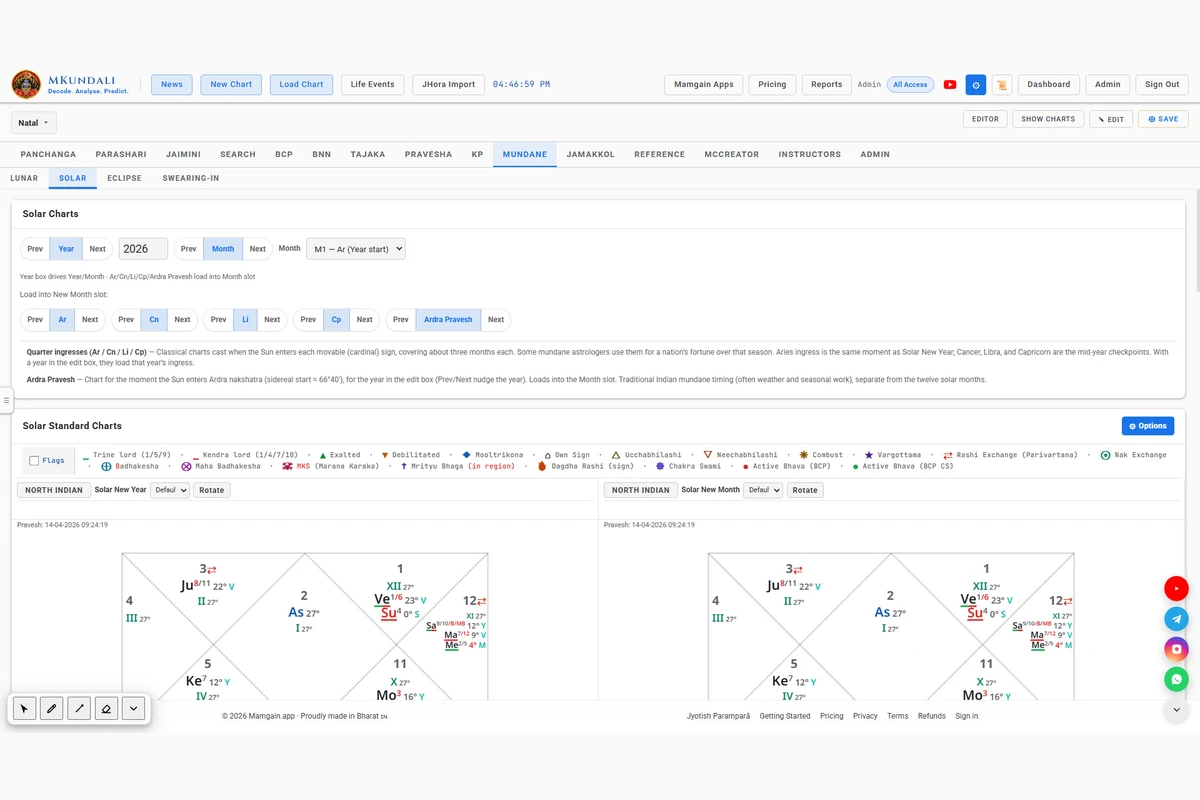
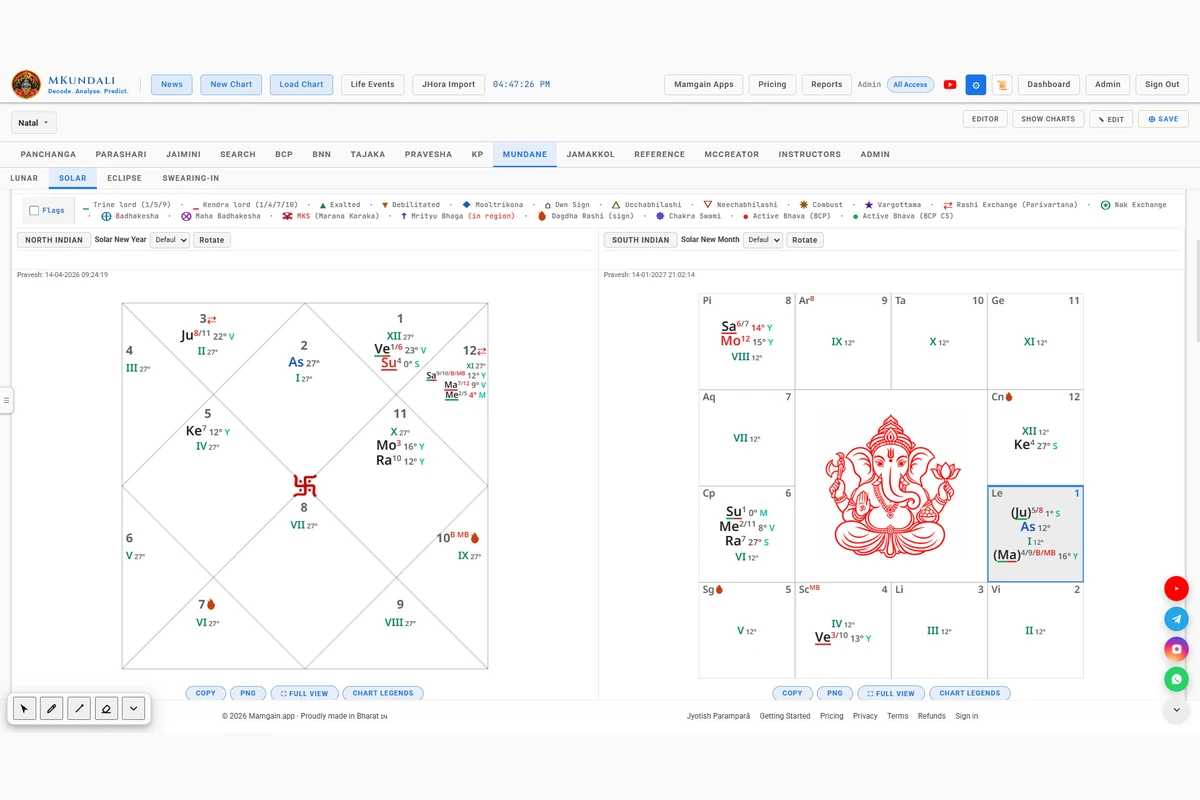
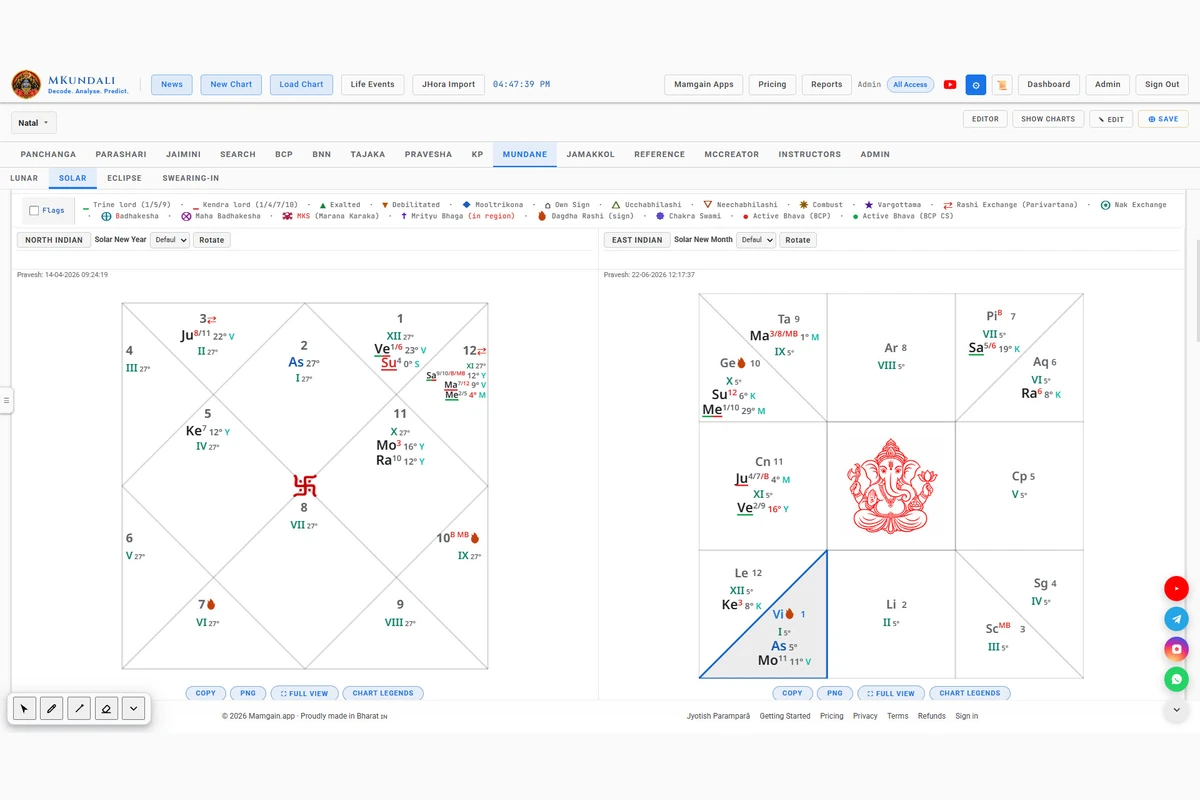
MKundali Mundane Solar workspace with Solar New Year and monthly ingress selector
Solar: New Year and monthly ingresses.
MKundali Mundane quarter ingress buttons for Aries, Cancer, Libra and Capricorn
Quarter ingresses: Ar, Cn, Li and Cp.
MKundali Mundane Ardra Pravesh control and chart
Ardra Pravesh: the Sun's entry into Ardra.

Subtab 3 of 4

Eclipse – Calculate Lunar, Global Solar and Local Solar Eclipse Charts

MKundali provides dedicated eclipse chart calculations using the Swiss Ephemeris eclipse search functionality. Three eclipse types are supported.

Lunar Eclipse

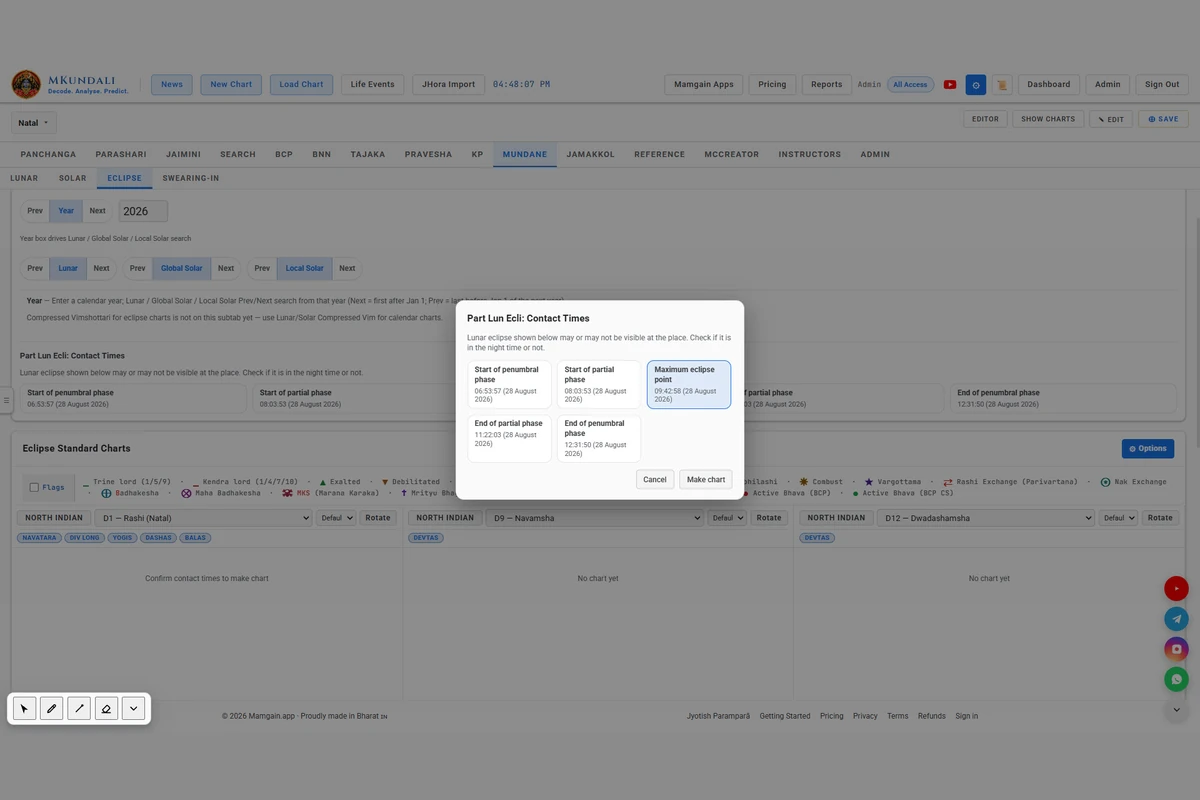
Search for previous and next lunar eclipses around the selected calendar year.

  • Lunar eclipse search
  • Eclipse type classification
  • Contact times
  • Chart at Start, Maximum or End
  • Planetary positions

A visibility note reminds you that a lunar eclipse may or may not be visible from the selected place. Check whether it falls in the night time.

Global Solar Eclipse

Search for global solar eclipses using the Swiss Ephemeris search functionality.

  • Global solar eclipse search
  • Eclipse type classification
  • Global contact times
  • Start, Maximum and End chart selection
  • Planetary positions

Local Solar Eclipse

Search for local solar eclipses using the selected geographical location.

  • Search at the chart place
  • Location-dependent contact times
  • Eclipse type classification
  • Start, Maximum and End chart selection

Results are calculated for the selected chart place. If no local eclipse is found near the date for that place, no local result is produced.

Contact-Time Examination

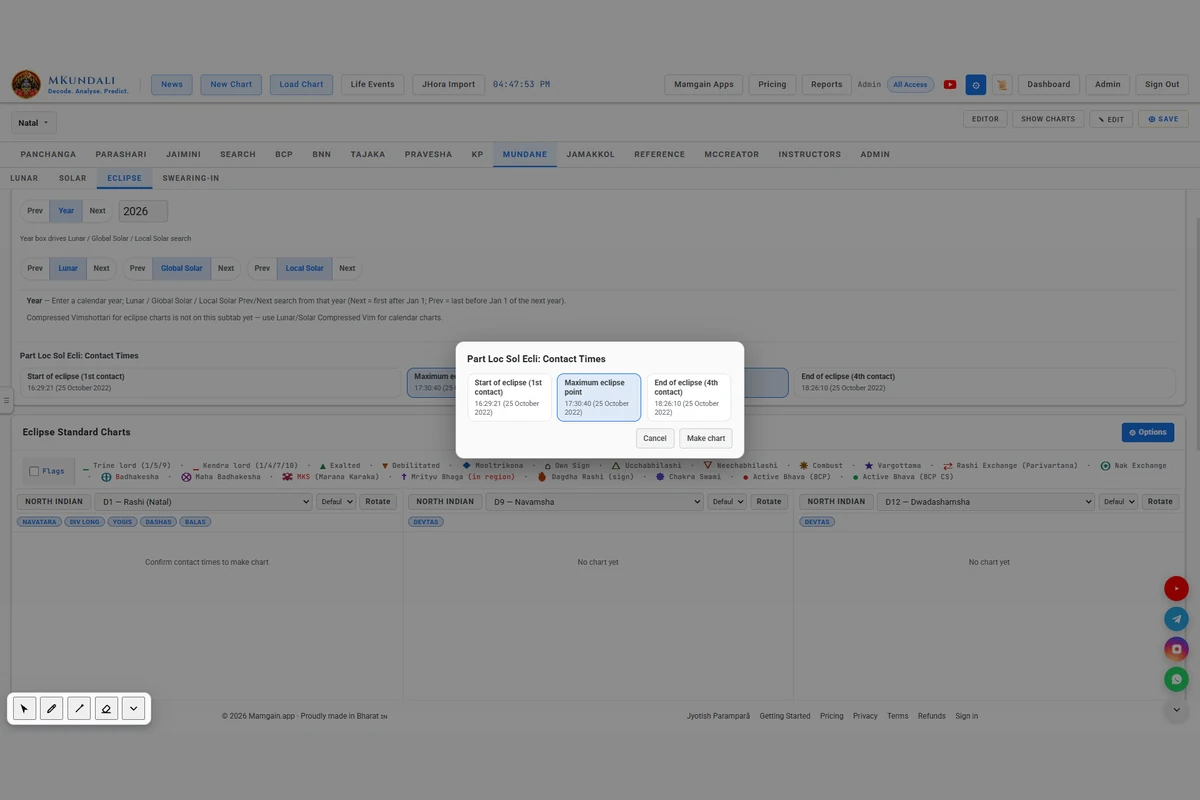
Before an eclipse chart is created, MKundali presents a contact-time preview.

  1. Select the calendar year.
  2. Choose Lunar, Global Solar or Local Solar.
  3. Select Previous or Next.
  4. Examine the available contact times.
  5. Select Start, Maximum or End as the chart moment.
  6. Confirm with Make chart.
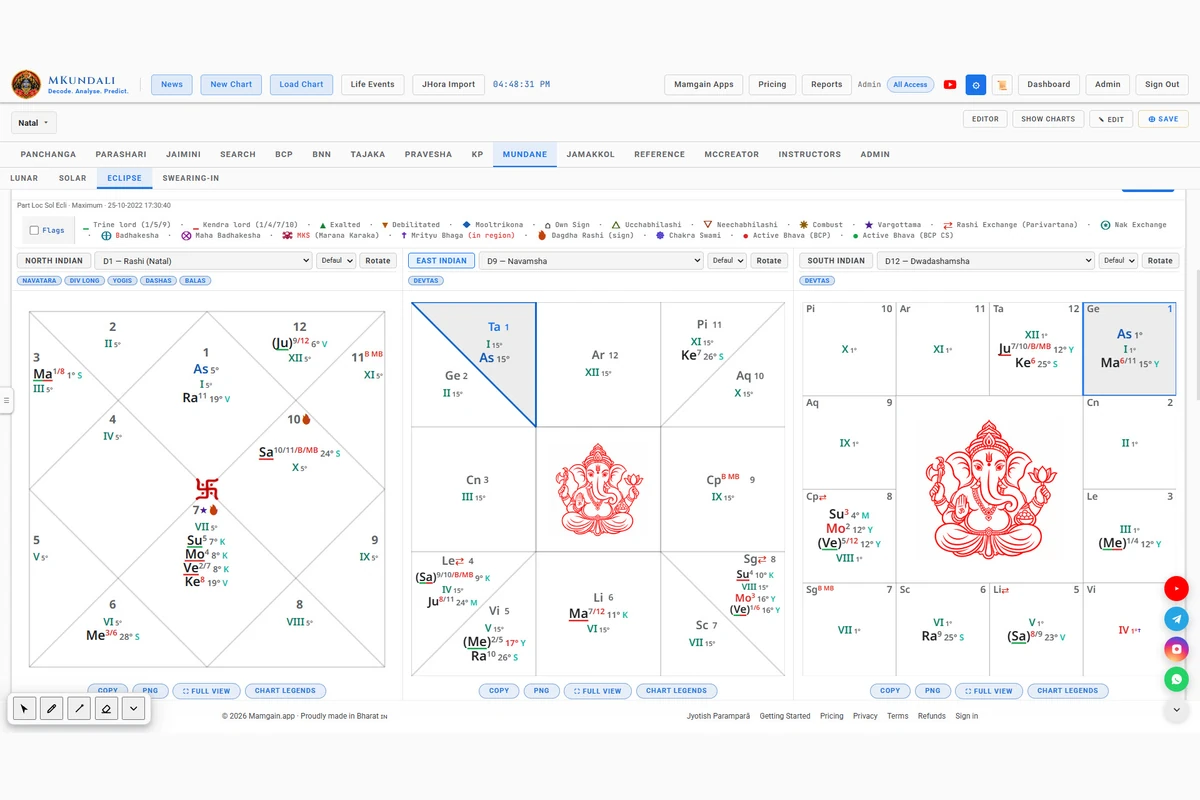
  7. Examine the resulting chart.

Next finds the first eclipse after 1 January of the year. Previous finds the last eclipse before 1 January of the following year. The interface works through Previous and Next searches, not a full annual list of eclipses.

Eclipse Chart Views

Examine the selected eclipse moment through three standard chart slots, currently configured as D1, D9 and D12. Use the Fusion Charts to compare the eclipse chart with selected divisional layers.

Compressed Vimshottari is not available in the Eclipse subtab. Eclipse dates, contact times and visibility are not guaranteed to be available for every place and search boundary.

MKundali Mundane eclipse contact-time preview with Make chart
Eclipse contact-time preview.
MKundali Mundane lunar eclipse chart
A lunar eclipse chart.
MKundali Mundane solar eclipse chart
A solar eclipse chart.

Subtab 4 of 4

Swearing-in – Examine the Term of an Office Through Compressed Vimshottari

MKundali provides a specialised Compressed Vimshottari facility for examining the term associated with an oath or swearing-in moment.

Set the Swearing-in Moment

  1. Set the main Chart Entry date and time to the oath or swearing-in moment.
  2. Set the relevant place.
  3. Calculate the chart with the existing application.
  4. Open the Mundane workspace.
  5. Select Swearing-in.
  6. Enter the office term.
  7. Click Calculate Dasha.

The chart calculation supplies the planetary positions and Moon Nakshatra used by the term Dasha. Swearing-in has no separate chart-entry system and no chart display of its own.

Configure the Office Term

Specify the duration of the term using either years or days.

  • Years
  • Days
  • User-entered term duration
  • Calculate Dasha action

Compressed Vimshottari

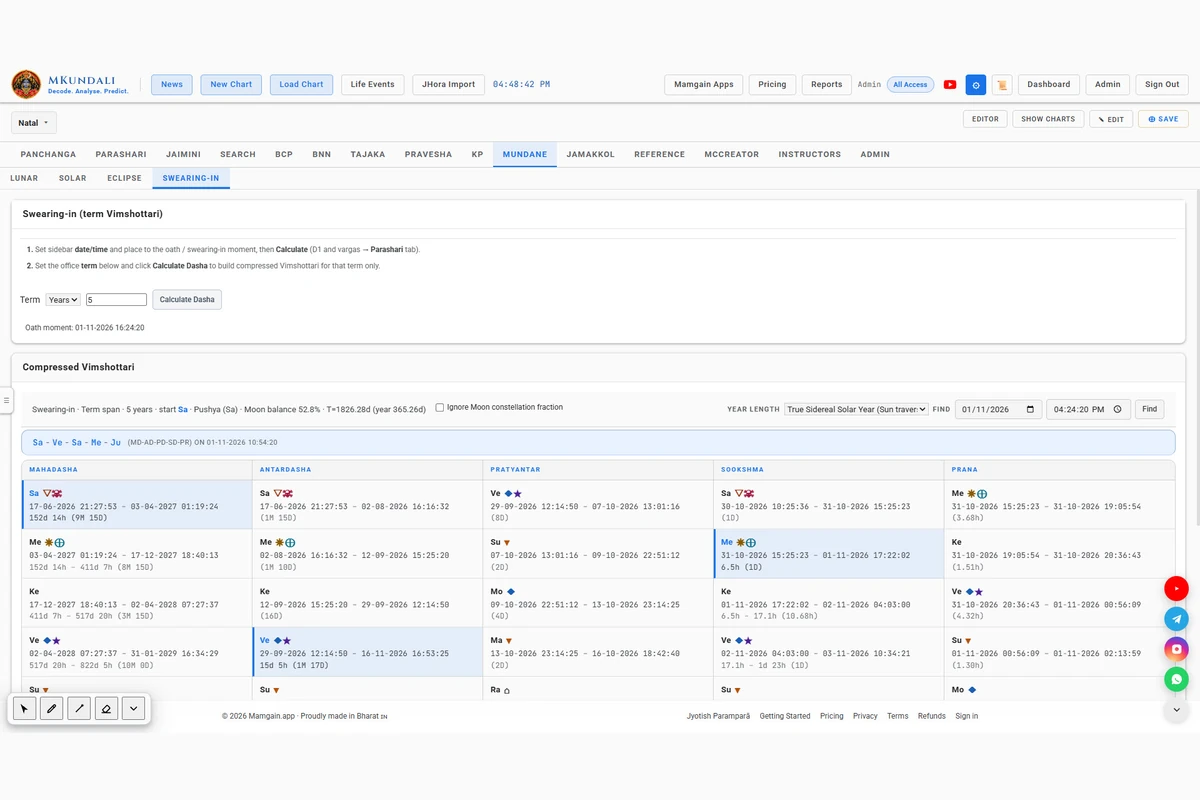
MKundali compresses the 120-year Vimshottari sequence into the selected term duration.

  • The natal Moon Nakshatra sets the starting Dasha Lord
  • The Moon’s remaining Nakshatra fraction is used by default
  • The first Dasha can be backdated so the oath moment falls inside the running period
  • Optional: Ignore Moon constellation fraction

With the option on, the full first Mahadasha starts at the oath moment instead.

Year-Length Preferences

  • Mean Sidereal Solar Year
  • Mean Tropical Solar Year
  • True Tropical Solar Year
  • True Sidereal Solar Year
  • Savana Year
  • Year with 360 Tithis
  • User-Defined Year

When the term is entered in years, the year-length option converts it to days.

Dasha Lookup

Use the date and time lookup to examine the running Dasha sequence at a selected point within the office term.

The calculation is limited to the term duration you enter.

An Important Distinction

Swearing-in Dasha is a term-based analysis facility. It is not an election prediction engine, and it does not guarantee that an individual will complete the selected term.

MKundali Mundane Swearing-in term Compressed Vimshottari
Swearing-in: term-based Compressed Vimshottari.

Charts

Standard and Fusion Charts – Examine Mundane Events in Multiple Views

MKundali provides standard and fusion chart arrangements for the Lunar, Solar and Eclipse workspaces.

WorkspaceStandard chart slotsFusion slots
Lunar4: Lunar New Year, Lunar New Month, Fortnight, New Lunar Day4, one per Lunar level
Solar2: Solar New Year, Solar New Month2, one per Solar level
Eclipse3: D1, D9, D123, for the selected eclipse chart with its outer layers

Chart Controls

  • Chart style selection
  • Chart rotation
  • Special point display options
  • Fusion inner and outer chart selection
  • Divisional chart selection
  • Chart export where available

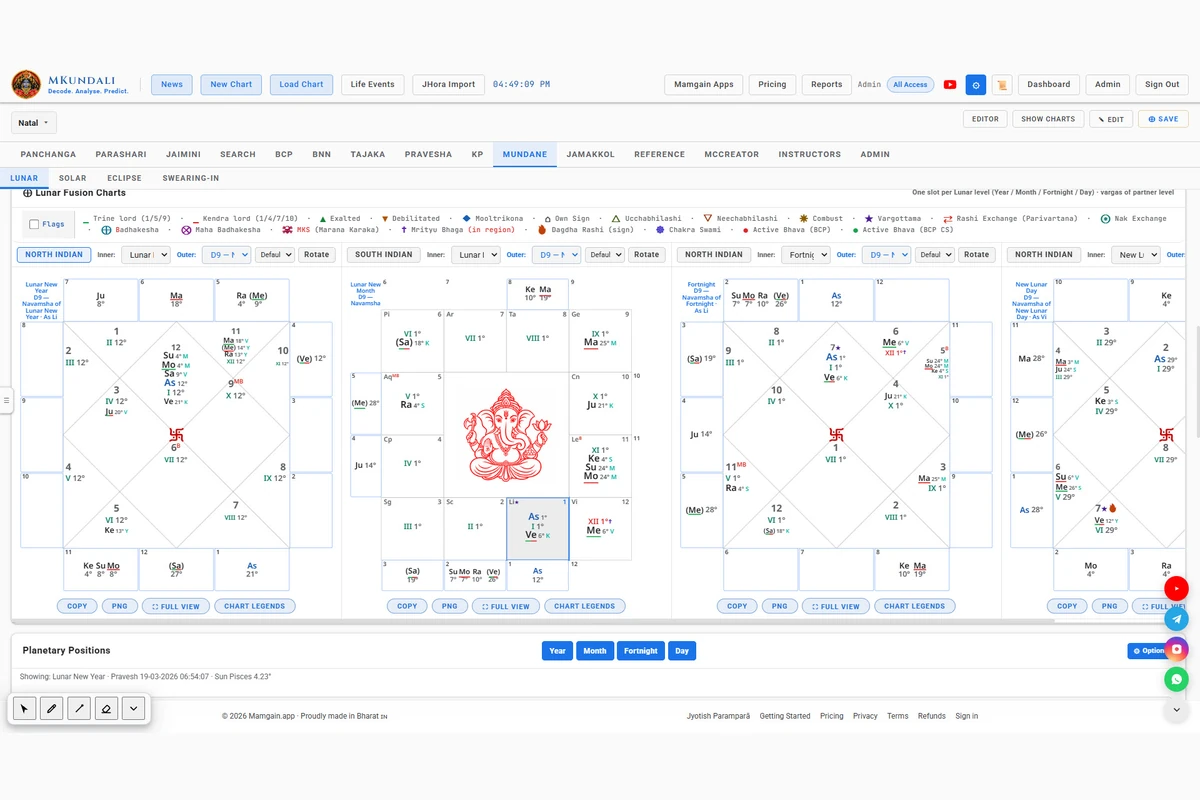
Fusion Charts

Use a Fusion chart to compare a Mundane chart with a selected divisional layer. The Lunar and Solar fusion slots default to a D9 outer chart.

Swearing-in does not have Standard or Fusion chart sections. It uses the main chart calculation and the term Dasha workflow.

MKundali Mundane Fusion Charts with inner and outer chart layers
Mundane Fusion Charts.

Analysis

Planetary Positions – Examine Every Selected Mundane Chart

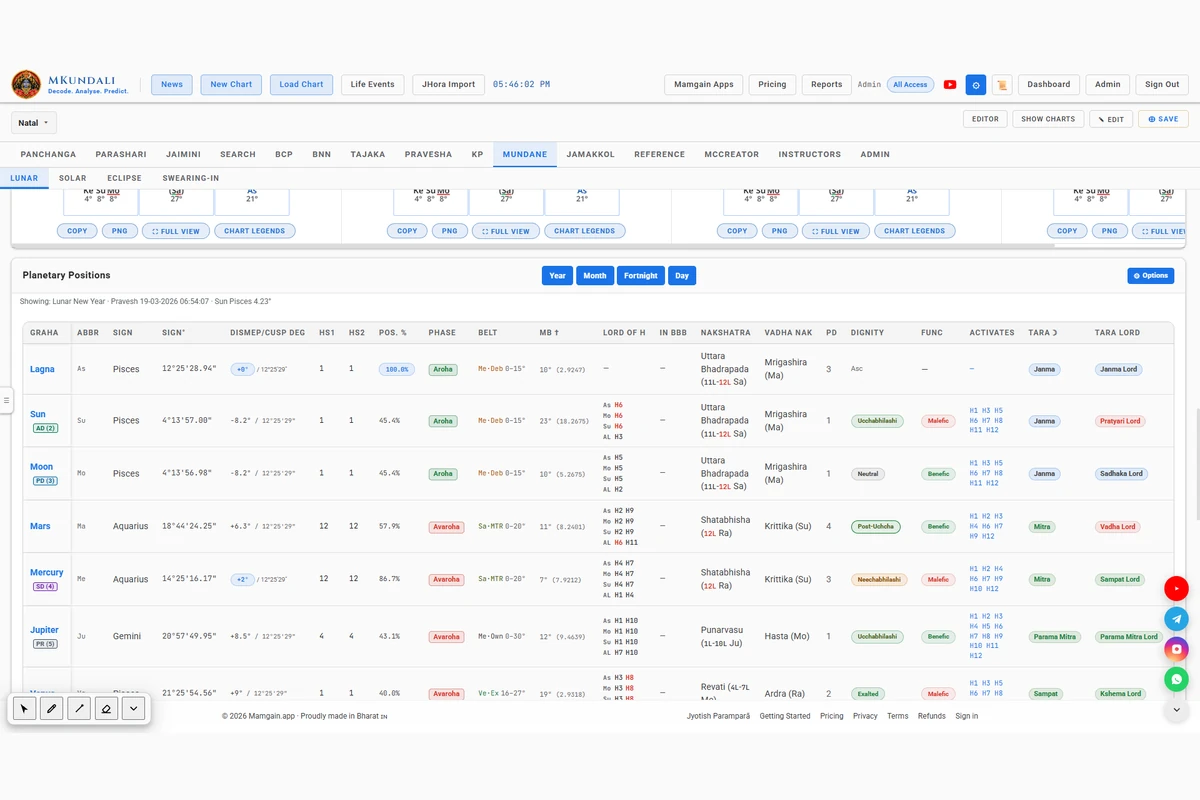
MKundali provides a detailed Planetary Positions table for the selected Lunar, Solar or Eclipse chart.

Source Selection

  • LLunar: Year, Month, Fortnight or Day
  • SSolar: Year or Month
  • EEclipse: the confirmed eclipse chart

Available Table Information

  • Planet and abbreviation
  • Sign and degree within sign
  • DISMEP and Cusp degree
  • Whole-sign house
  • Bhava house
  • Positional percentage
  • Aroha and Avaroha phase
  • Belt
  • Mrityu Bhaga
  • House lordships
  • Bhavat Bhavam
  • Nakshatra and Pada
  • Vadha Nakshatra
  • Dignity
  • Functional nature
  • Activates
  • Navtara and Tara Lord
  • Daily motion
  • Latitude
  • Tropical longitude
  • Kranti
  • KP Rashi, Nakshatra and Sub Lords
  • Deeper KP divisions
  • Planetary flags

Configurable Columns

Use the existing column visibility controls to configure the displayed information. Not every column is shown at all times.

This is the shared Planetary Details infrastructure applied to the selected Mundane chart. The columns are not calculations exclusive to Mundane astrology.

MKundali Mundane Planetary Positions table with the Year to Day source selector
Planetary Positions for the selected Mundane chart.

Timing

Compressed Vimshottari – Examine Dasha Within Mundane Calendar Periods

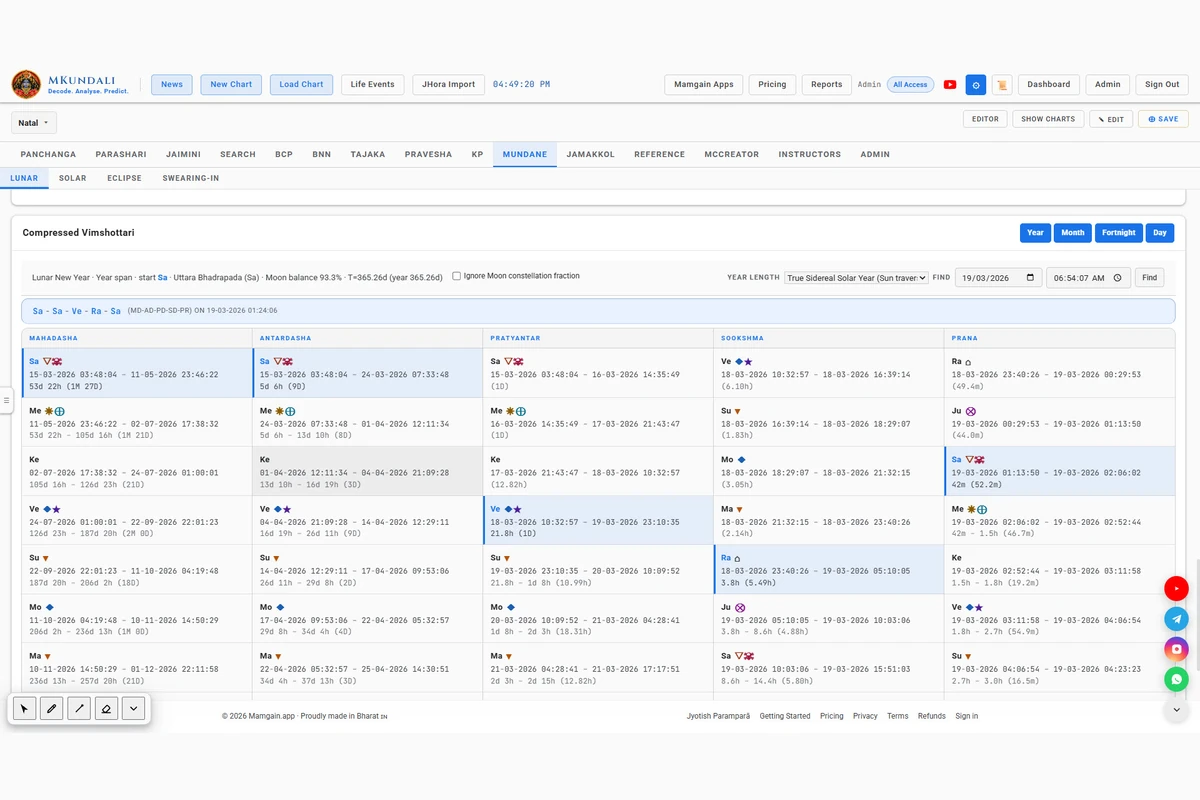
MKundali provides Compressed Vimshottari for Lunar and Solar calendar charts, allowing the classical 120-year Vimshottari sequence to be represented within the selected mundane calendar period.

Source Levels

  • LLunar: Lunar Year, Lunar Month, Fortnight, New Lunar Day
  • SSolar: Solar Year, Solar Month

Compressed Vimshottari is not available for Eclipse charts. It is not yet in the Eclipse subtab.

How the Timeline Is Compressed

The 120-year sequence is fitted into the selected period, starting at that chart’s moment. The span depends on the level and on the year-length option:

  • YYear: one year-length
  • MMonth: one-twelfth of it
  • FFortnight: one twenty-fourth
  • DDay: one three-hundred-and-sixtieth

The span is a proportion of the selected year-length, not the measured length of that particular lunar or solar period.

Moon Nakshatra Balance

By default, the first Mahadasha uses the remaining Moon Nakshatra balance, following a JHora-style approach.

The optional setting Ignore Moon constellation fraction starts the full first Mahadasha at the selected chart moment.

Year-Length Options

  • Mean Sidereal Solar Year
  • Mean Tropical Solar Year
  • True Tropical Solar Year
  • True Sidereal Solar Year
  • Savana Year
  • Year with 360 Tithis
  • User-Defined Year

The Dasha Browser

Use the Dasha browser to examine the Mahadasha and its subsequent period levels, including date-based lookup. The lower subdivisions are computed by the existing Dasha browser implementation.

MKundali Mundane Compressed Vimshottari browser with year-length controls
Compressed Vimshottari for a Lunar or Solar chart.

Why MKundali

A Connected Workspace for Mundane Chart Analysis

Mundane astrology examines significant calendar boundaries, planetary ingresses, eclipses and important public events. MKundali brings several of these calculations into one integrated workspace.

  • Lunar New Year
  • Lunar New Month
  • Fortnight
  • New Lunar Day
  • Amanta, Suklanta and Solar month definitions
  • Solar New Year
  • Twelve Solar month ingresses
  • Four quarter ingress charts
  • Ardra Pravesh
  • Lunar eclipses
  • Global solar eclipses
  • Local solar eclipses
  • Eclipse contact-time preview
  • Start, Maximum and End eclipse charts
  • Swearing-in term-based Vimshottari
  • Planetary Positions
  • Lunar and Solar Compressed Vimshottari
  • Standard and Fusion Charts

MKundali provides calculation and analysis tools. It does not automatically predict national fortunes, political outcomes, elections or weather. Interpretation remains with the astrologer. For individual annual charts, see Tajaka and Pravesha.

FAQ

Frequently Asked Questions

What is Mundane Astrology?

Mundane astrology examines astrological charts associated with public events, calendar boundaries, planetary ingresses, eclipses and other events involving countries, regions and collective affairs.

What Mundane tools are available in MKundali?

The Mundane workspace has four subtabs: Lunar, Solar, Eclipse and Swearing-in.

Does MKundali calculate Lunar New Year charts?

Yes. It calculates the Sun–Moon conjunction occurring in the selected year-start sign.

Can I change the lunar month definition?

Yes. The Lunar Calendar preferences provide Amanta, Suklanta and Solar month-definition options, together with a configurable year-start sign.

Does MKundali support Solar New Year?

Yes. Solar New Year is calculated at the Sun’s sidereal ingress into Aries.

What are Quarter Ingress charts?

They are charts calculated when the Sun enters Aries, Cancer, Libra and Capricorn. They provide four seasonal checkpoints during the solar year.

What is Ardra Pravesh?

Ardra Pravesh is the chart for the moment the Sun enters Ardra Nakshatra. MKundali calculates it separately from the twelve regular solar month ingresses.

Which eclipse types are available?

MKundali supports Lunar, Global Solar and Local Solar eclipse charts.

Can I choose the eclipse chart time?

Yes. The available options are Start, Maximum and End. Contact times are previewed before confirming the chart.

Does MKundali provide Vimshottari for Mundane charts?

Yes. Compressed Vimshottari is available for Lunar Year, Month, Fortnight and Day, as well as Solar Year and Month.

Can I examine Dasha for the term of an office?

Yes. The Swearing-in workspace allows a term duration in years or days to be used for Compressed Vimshottari analysis from the selected oath moment.

Does MKundali calculate Compressed Vimshottari for eclipses?

No. This functionality is not currently available in the Mundane Eclipse subtab.

Are all Mundane tools available under every subscription?

Access to individual tools may depend on subscription plans and entitlements. Refer to the Pricing page for current availability.

Explore Mundane Astrology with MKundali

Examine lunar and solar calendar boundaries, quarter ingresses, Ardra Pravesh, eclipse charts and Swearing-in Dasha through one integrated Mundane workspace.